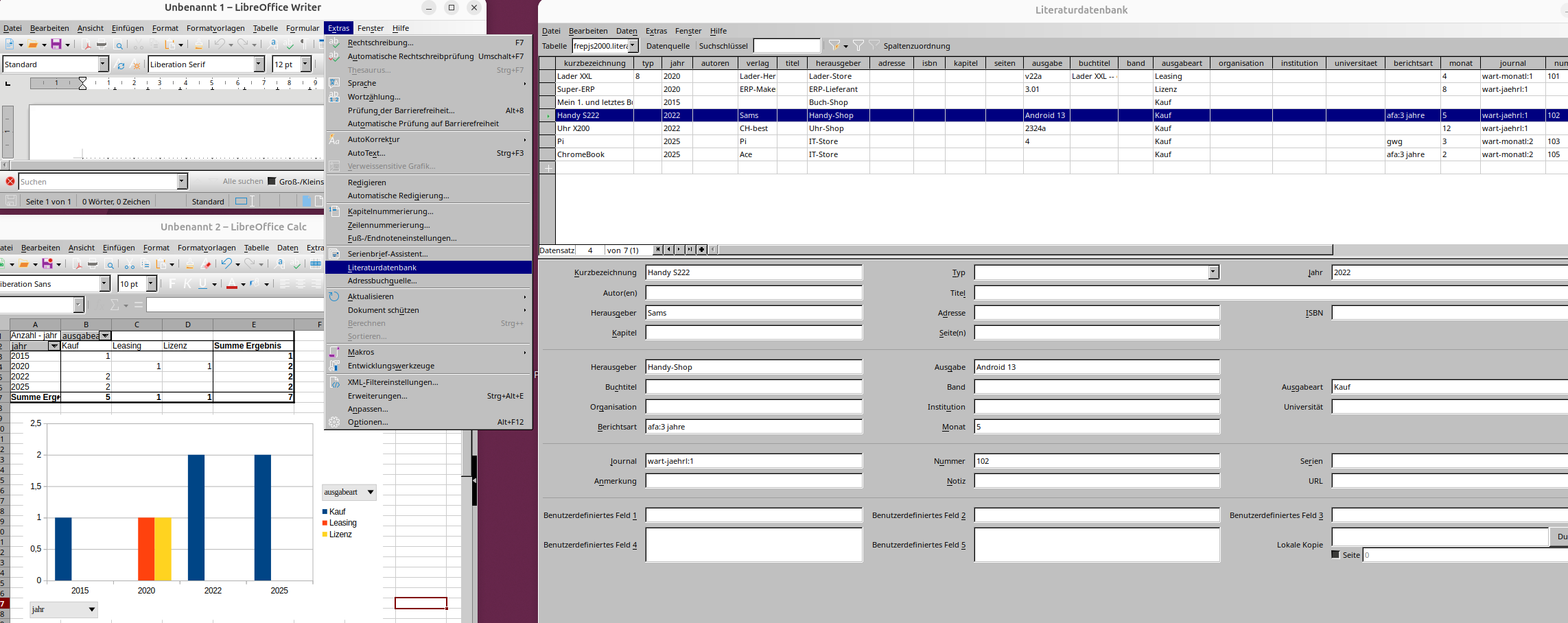
per
- LibreOffice Writer
- Extras
- Literaturdatenbank
und den erfassten Daten
- in einer PostgreSQL-Datenbank
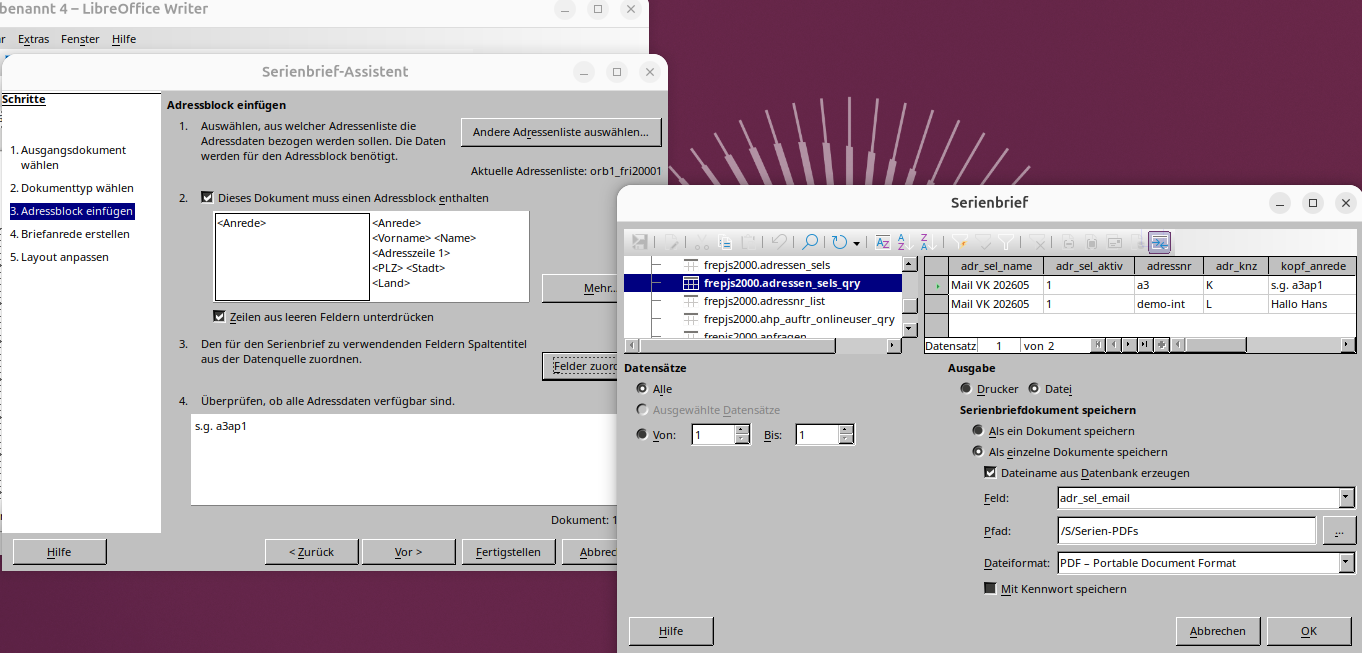
Per Serien-PDF oder Etiketten-Funktion können die Daten weiterverwendet werden.
z.B.
CREATE TABLE frepjs2000.Literatur
(
Kurzbezeichnung varchar(255),
Typ varchar(255),
Jahr varchar(255),
Autoren varchar(255),
--
verlag varchar(255),
--
Titel varchar(255),
Herausgeber varchar(255),
Adresse varchar(255),
ISBN varchar(255),
Kapitel varchar(255),
Seiten varchar(255),
Ausgabe varchar(255),
Buchtitel varchar(255),
Band varchar(255),
Ausgabeart varchar(255),
Organisation varchar(255),
Institution varchar(255),
Universitaet varchar(255),
Berichtsart varchar(255),
Monat varchar(255),
Journal varchar(255),
Nummer varchar(255),
Serien varchar(255),
Anmerkung varchar(255),
Notiz varchar(255),
URL varchar(255),
Benutzerdefiniertes_Feld_1 varchar(255),
Benutzerdefiniertes_Feld_2 varchar(255),
Benutzerdefiniertes_Feld_3 varchar(255),
Benutzerdefiniertes_Feld_4 varchar(255),
Benutzerdefiniertes_Feld_5 varchar(255),
Lokale_Kopie varchar(255),
--
CONSTRAINT Literatur_pkey PRIMARY KEY (Kurzbezeichnung)
)
;
GRANT INSERT, DELETE, SELECT, UPDATE ON TABLE frepjs2000.Literatur
TO frepjs2000_role;
- 1 - (TxtDoc-2026-10-17.html)
�
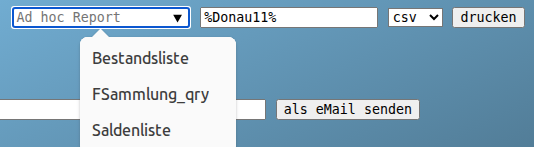
Voraussetzungen für einen AReport:
- Schemen sind zulässig
- Angemeldeter Benutzer ist berechtigt
- View endet mit dem Namen "_qry"
Vorteile:
- Wenn bereits passende Views vorhanden sind,
kann man diese ohne Programmänderung verfügbar machen. ( Berechtigung prüfen )
- Man kann nach einem beliebigen Text in den Zeilen filtern. (z.B. Erfolg)
- Die Ausgabe ist als Text(html) oder csv möglich.
- Neben "download" steht auch die Funktion "als eMail senden" zur Verfügung.
(auch bei verwalteten Gastsitzungen möglich -- https://support.google.com/chrome/a/answer/3017014)
Nachteil:
- z.B. keine Summen -- also eher CSV nutzen und per Tabellenkalkulation nutzen.
--> /frepjs2000/AReport?nur_AREPORT=Stueckliste&report_search_text=O-W&format=html
- 2 - (TxtDoc-2026-10-17.html)
�
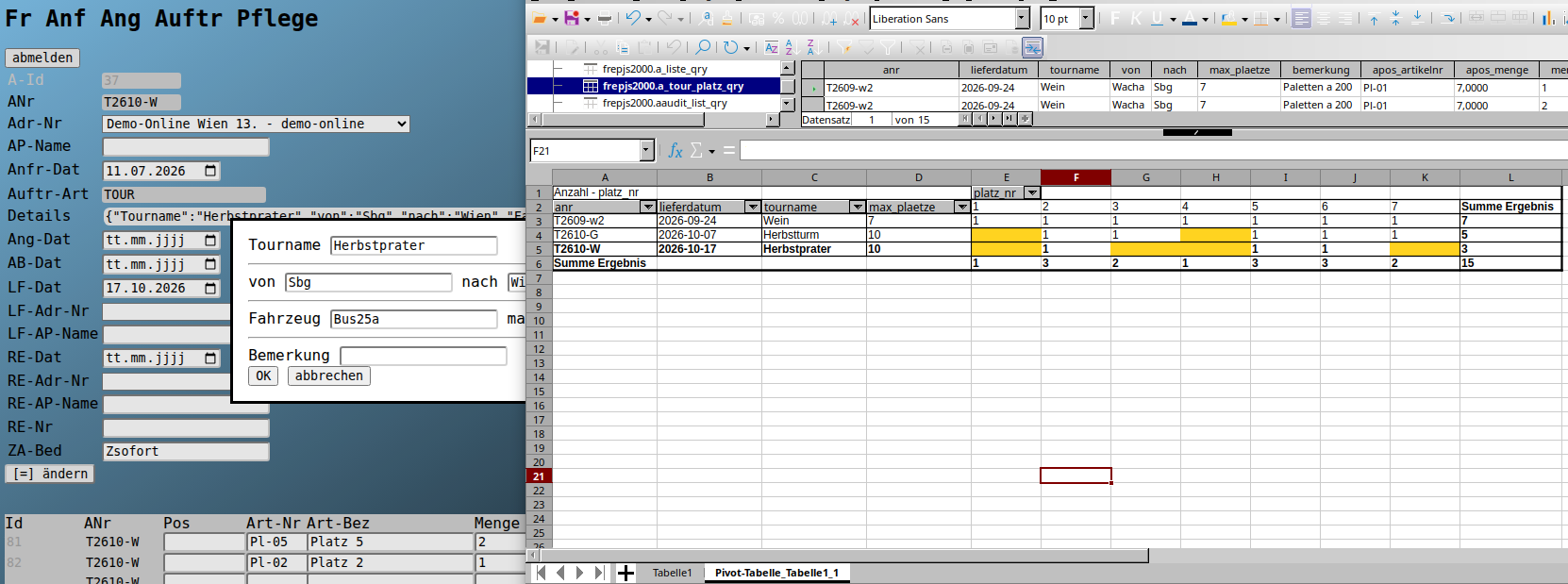
Wenn bei Aufträgen mit
- Auftr-Art "TOUR"
in den Positionen der
- Artikel "Platz..."
verwendet wird,
kann man nicht genutzte Plätze oder Doppelbelegungen anzeigen.
Wenn mehrere Plätze vergeben werden sollen,
ist die Artikelnummer des 1. zu reservierenden Platzes zu verwenden
und im Feld Menge die Anzahl der zusammenhängenden Plätze.
z.B.
--> /frepjs2000/Fr_Anf_Ang_Auftr_Pflege?submitaction=%2F%3D%2F&datatable_primarykey=37
- 3 - (TxtDoc-2026-10-17.html)
�
Für alle Kosten im Aussendienst zu verwenden.
Bei Problemen: +43 664 3376423
Dateien bevorzugt als kompakte .html oder .txt angeben bzw. anlegen.
z.B.
- https://jobst-software.net/aea_cos/?submitaction=%2F%3D%2F&datatable_primarykey=5
- oder mit Nextcloud Tabellen
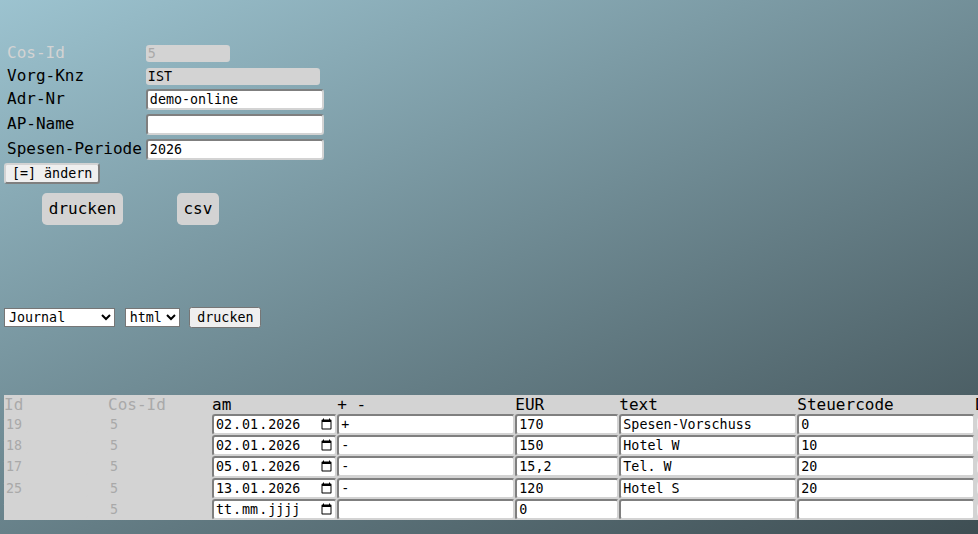
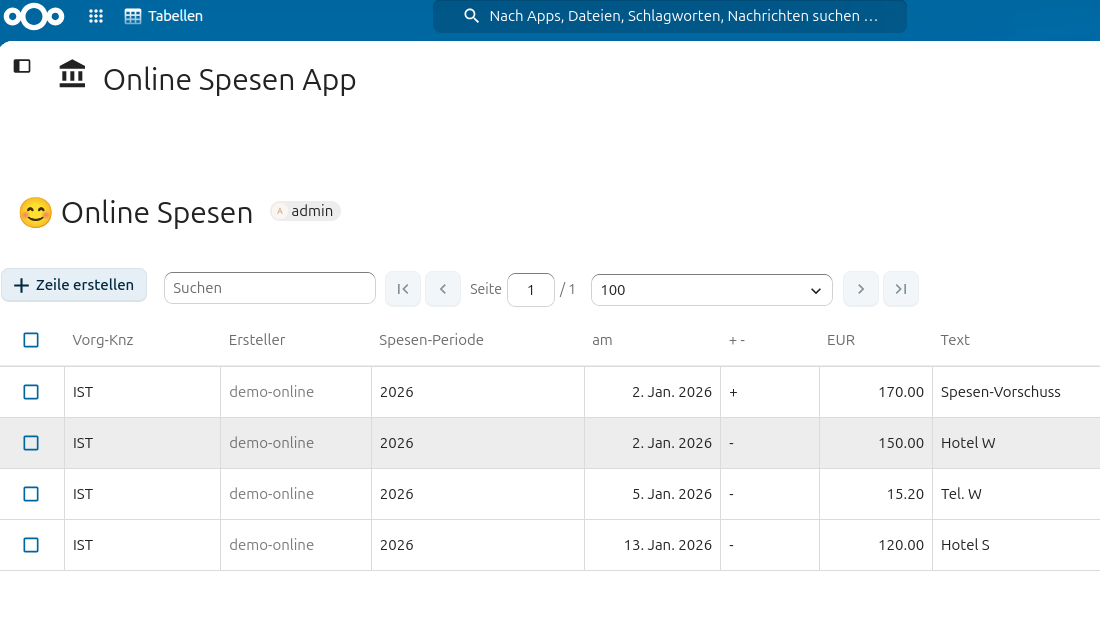
Hinweis: Bitte vorerst nur den Steuercode 0 (0%) verwenden, da die Buchhaltung diese Arbeit übernimmt.
- 4 - (TxtDoc-2026-10-17.html)
�
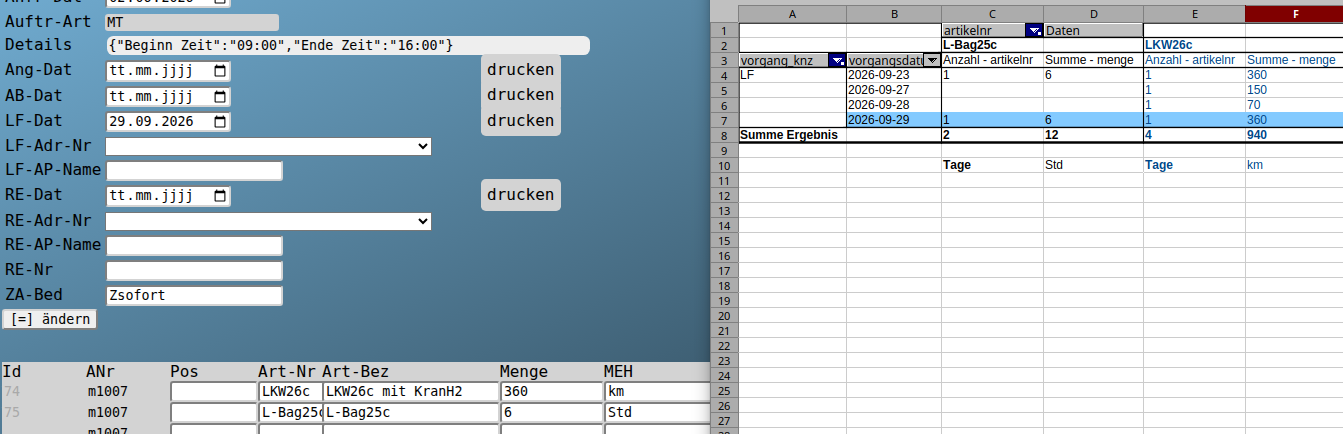
z.B. durch
- Anlage einer Auftragsart "MT" für Miete tagweise und Dialog mit Beginn/Ende-Status
- Anl. Artikel mit den AFA-Anteilen pro Jahr
- Auftraege mit Miettermin(=Liefertermin)
und Kontrolle per Office
- ob die Auslastung passt und an keinem Tag ein Teil doppelt verkauft wurde.
--> /ahp_auftr/?submitaction=%2F%3D%2F&datatable_primarykey=33
- 5 - (TxtDoc-2026-10-17.html)
�
Voraussetzungen sind:
- Auftrag mit PosNr "aL2..." (z.B. aL26015-do-Supp) ist angelegt
und
- Leistungszeiten werden mit Angabe der Auftrags-PosNr eingetragen.
Die Rechnungs-Menge entspricht den Stunden der Zeiteingabe
und -Preis, -Rabatt dann lt. Auftragsposition.
z.B.
- https://jobst-software.net/ahr_cal/Hr_Calendar_Pflege?submitaction=%2F%3D%2F&datatable_primarykey=12
- oder mit Nextcloud WorkTime

--> /ahr_cal/Hr_Calendar_Pflege?submitaction=%2F%3D%2F&datatable_primarykey=12
- 6 - (TxtDoc-2026-10-17.html)
�
Die Nutzung eines Datenbankservers ist die logische strukturelle Weiterentwicklung
eines begonnenen Datenbankprojektes.
Z.B. Übertragung der Datentabellen auf einen SQL-Server.
Im Office bleibt dann die Funktionalität
und im SQL-System 100% der Daten.
Damit sind in den MDB/ACCDB/ODT-Dateien keine Daten mehr
und man hat folgende Optionen
- ReadOnly-Modus
- Arbeit mit einer Kopie
- oder Software-Vereilung wie bei anderen Programmen
Die Installation von ODBC/SDBC-Treibern auf allen Clients ist zusätzlich erforderlich.
( die Office Installation ist weiterhin erforderlich )
Oder weg von klassischen Datenbank-Abfragen, Berichten
und Euro-Office nutzen
ergänzt z.B. mit
- Power BI
- Power Query
- Nextcloud Tabellen
- ...
--> https://learn.microsoft.com/en-us/power-bi/transform-model/desktop-query-overview#the-query-ribbon
--> https://www.google.com/search?q=nextcloud+tabellen+app
Office mit Datenbanknutzung
Die häufigsten Textdokumente (PDFs) liefern wahrscheinlich Report/Bericht-Funktionen mit SQL-Basis.
Auch für Seriendokumente (= wie Berichte ohne Gruppierungsmöglichkeit)
und Etiketten werden SQL-Quellen verwendet.
Für Pivot und Chart (Tabellenkalkulation) sind SQL-Quellen im Office auch brauchbar.
Wenn der Prototyp ewig verwendet wird,
folgen Meinungen, wie
- technische Schulden
- Schatten-IT
Für Dinge, die sich dauernd ändern,
lohnt sich ausprogrammierenen nicht.
Wenn andererseits Das täglich benutzt wird,
sollte man aus dem Prototyp ein Programm machen.
Konvertiereren mehrerer Dokumente
z.B. auf .pdf von .doc.
- libreoffice --convert-to pdf serien_*.doc
s.a.
- https://help.libreoffice.org/latest/de/text/shared/guide/convertfilters.html
- 7 - (TxtDoc-2026-10-17.html)
�
Office-Funktionen
- Pivot (Kreuztabellen)
- Charts (Diagramme)
- Seriendokumente (Etiketten, Mail, ...)
- Import / Export
- Abfragen / Reports
Als Datenquelle stehen die Tabellen, Abfragen (Views) und Funktionen der SQL zur Verfügung.
Die Berechtigung ergibt sich aus der Anmeldung und der damit verbundenen Rolle.
z.B.
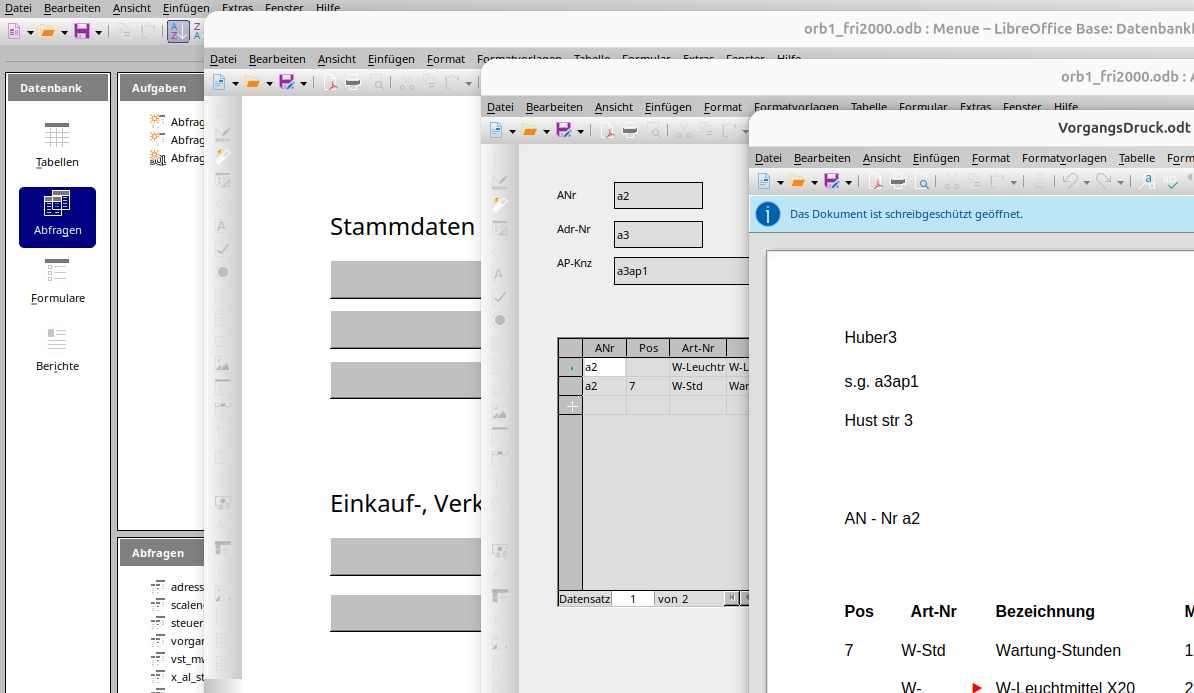
--> /ahr_cal/?submitaction=%2F%3D%2F&datatable_primarykey=12
ev. weitere Funktionen
- Anfrage
- Angebot
- Lieferschein
- Rechnung
- Mahnung
Eingabe
-------
- ein Mastersatz für alle o.g. Funktionen
- Positionen (Artikel, Menge, Preis, Rabatt)
Bericht: Z.B. als Text- oder Tabellendokument
Status: Wenn ein Angebots-, Lieferschein-, ... Datum eingegeben wurde, dann ist das der Status (also z.B. geliefert, wenn Lieferdatum gepflegt)
Dateien: Die Datensätze Anfrage/Auftrag, Artikel, Adresse haben jeweils ein autom. angelegtes Datensatz-Verzeichnis
Archiv: Dokumente sind als .eml, .pdf, ... unter o.g. Datensatz-Verzeichnis zu speichern
- 8 - (TxtDoc-2026-10-17.html)
�
z.B.
aus dem erfassten Bestand
- O-Sostr-Lager
- O-W13rp-Lager1
- O-W13rp-Lager2
- ...
Rechnungen kalkulieren
- Miete
- BK
- ...
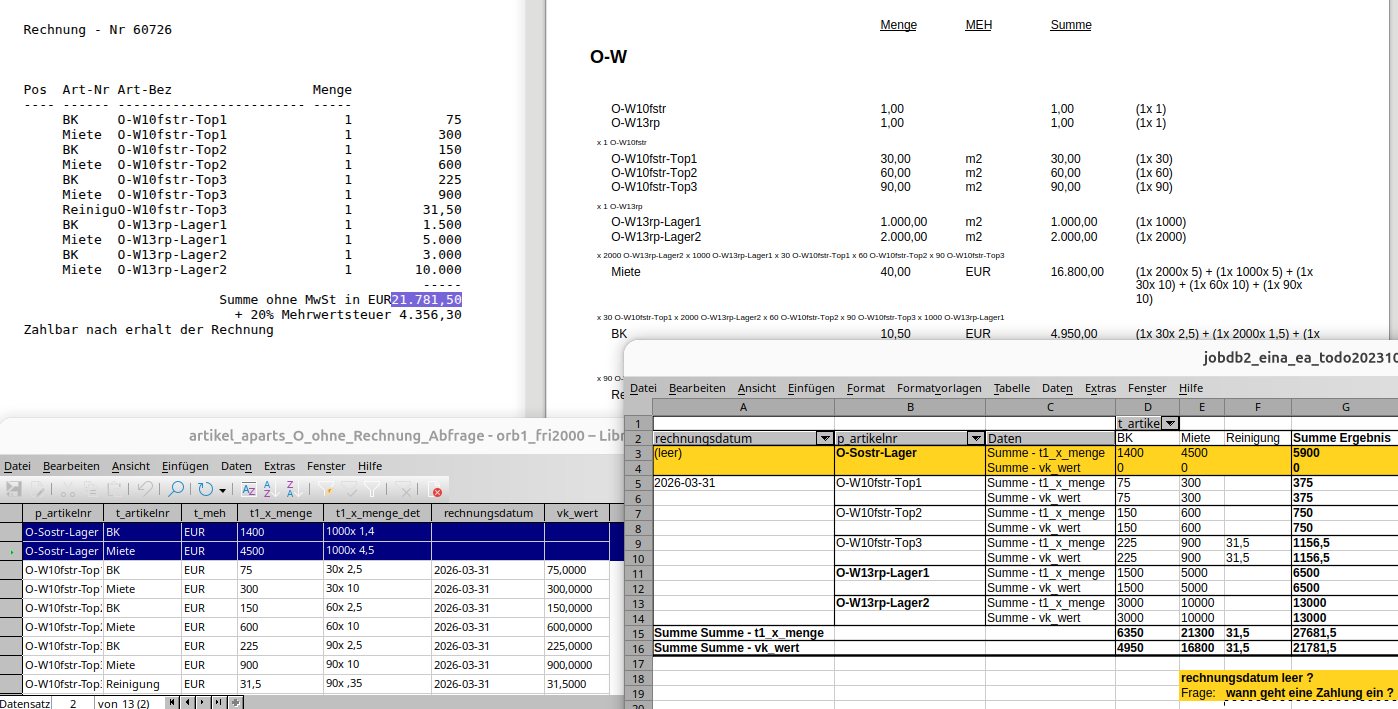
--> /frepjs2000/Fr_Anf_Ang_Auftr_Pflege?submitaction=%2F%3D%2F&datatable_primarykey=25
Grundstücke, Lagerhallen und Co
kann man auch als Stücklisten betrachten.
- 9 - (TxtDoc-2026-10-17.html)
�
Es gibt Seiten, die haben alle Daten dabei.
Oder ein Server bzw. Webservice eines Dritten,
stellt die Daten zur Verfügung.
Dann könnte eine HTML-Datei reichen,
um per
- TypeScript/JavaScript HTML CSS
die Daten zu nutzen.
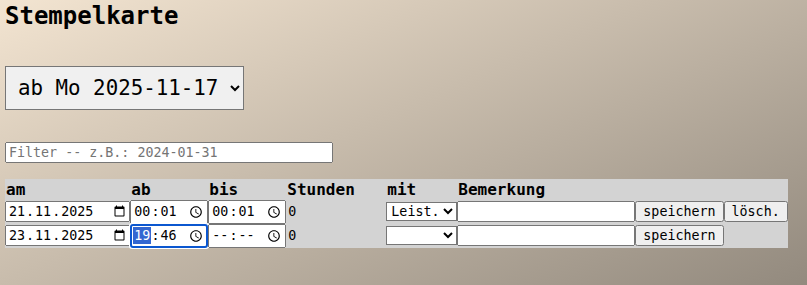
--> http://kantn.jobst-software.net:8080/aussendienst4/stempelkarte4.html
HTML kann einfach sein (<h3>Überschrift</h3> <p>Text</p> <h3>...</h3> <p>...)
und samt
- CSS
- JavaScript
- ohne Zusatzsoftware
anzeig- und druckbar per Browser.
( z.B. kann man mit einer HTML-Datei eine kleine App umsetzen )
HTML funktioniert mit
- HTTP-Servern
- Dateiservern
- SQL (die den Datentyp XML kennt)
- ...
und kann vom jeweiligen Berechtigungssystem profitieren.
HTML kann man auch so gestalten, dass es maschinenlesbar (XML) ist.
- 10 - (TxtDoc-2026-10-17.html)
�
Also Todo für den Rest,
und man hat es im
- Kalender für Alles
- Protokoll.
--> /a_todo4/
- 11 - (TxtDoc-2026-10-17.html)
�
für
- Ad-hoc-Bereitschaft
- Ad-hoc-Inventur
- Ad-hoc-Test
- ...
Meist mit "Details" tituliert.
Der modale Details-Dialog öffnet sich nach Klick ins Datenfeld.
z.B.
ADialog-Umsetzung
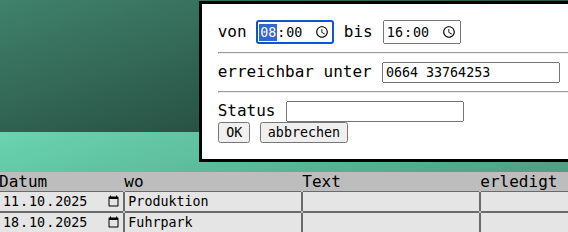
--> /a_todo4/?submitaction=%2F%3D%2F&datatable_primarykey=12
- 12 - (TxtDoc-2026-10-17.html)
�
für Auftragsart
- EK Einkauf
- VK Verkauf
- FE FE
- IT IT
- ...
oder Adressart
- I Interressent
- K Kunde
- L Lieferant
- M Mitarbeiter
- ...
oder Artikelgruppe
- Anl.
- Elektr.
- O-Bestand
- O-Einn.
- ...
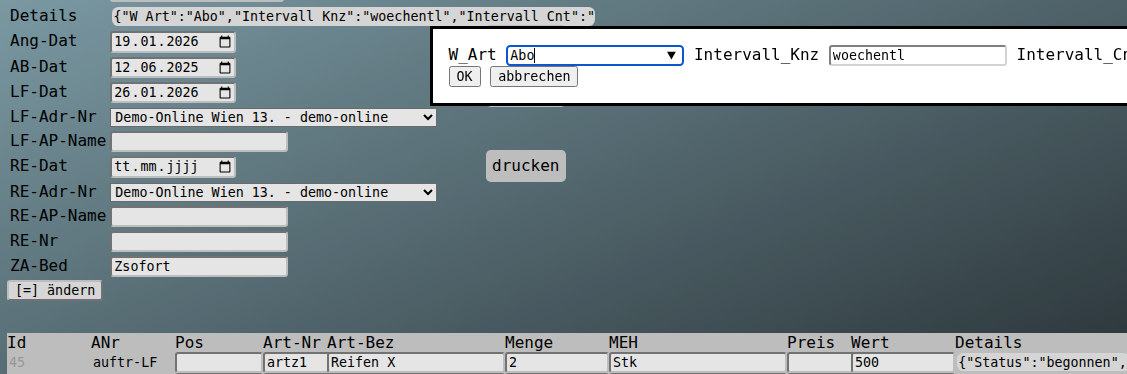
Mit "Details" tituliert.
Der modale Details-Dialog öffnet sich nach Klick ins Datenfeld.
z.B.
ADialog-Umsetzung
--> /ahp_auftr/?submitaction=%2F%3D%2F&datatable_primarykey=21
- 13 - (TxtDoc-2026-10-17.html)
�
Bitte Urlaube möglichst 2 Wochen vorher eintragen
(bei mehr als 2 Tagen 1 Monat vorher)
--> /ahr_cal/
- 14 - (TxtDoc-2026-10-17.html)
�
Nicht abgegebene Umfragen,
werden als Stimmenthaltung gewertet.
Bei entsprechender Beteiligung,
gilt dann die Mehrheit der Abgaben.
--> /aqa_quest/
- 15 - (TxtDoc-2026-10-17.html)
�
Die Zeitsumme sollte die normale Arbeitszeit des jeweiligen Tages ergeben.
z.B. bei Vollzeit
- Mo bis Do 8 Stunden
- und Fr 4 Stunden
- 16 - (TxtDoc-2026-10-17.html)
�
{
"SELECT_FDNAMES": "artikelnr, p_artikels, t_artikelnr, t_menge, t_mehs, t1_x_menge, t1_x_menge_dets",
"FROM_SCHEMA": "frepjs2000",
"FROM_QRY": "Artikel_AParts_t1_x_t_artikelnr_sum_qry"
}
- 17 - (TxtDoc-2026-10-17.html)
�
<dialog id="dialog_wart_details">
<form> <input name="json_input_ele_no" readonly type="hidden" />
<label>Beschau</label> <input name="Beschau" type="datetime-local" /> <input name="Bemerkung_B" placeholder="Bemerkung" /> <hr />
<label>Abnahme</label> <input name="Abnahme" type="datetime-local" /> <input name="Bemerkung_A" placeholder="Bemerkung" /> <hr />
</form>
<button name="btnOK" >OK</button>
<button name="btnCancel" >abbrechen</button>
</dialog>
<dialog id="dialog_apos_details">
<form> <input name="json_input_ele_no" readonly type="hidden" />
<label>Erledigung</label> <input name="Erl_Dat" type="datetime-local" /> <input name="Erl_Status" list="ERLEDIGUNG_LIST" />
<hr />
<label>Pos_Bemerkung</label> <input name="Pos_Bemerkung" />
</form>
<button name="btnOK" >OK</button>
<button name="btnCancel" >abbrechen</button>
</dialog>
<datalist id="ERLEDIGUNG_LIST">
<option>neu</option>
<option>ausgetauscht</option>
<option>saniert</option>
</datalist>
- 18 - (TxtDoc-2026-10-17.html)
�
z.B. für Datenquellen,
für die man eine URL hat
und als Abfrage oder im Tabellenkalkulationsprogramm nutzen möchte.
Die Arbeit übernimmt hier die SQL
und das Tabellenkalkulationsprogramm braucht nativen Zugriff auf die SQL-Datenbank (z.B. per SDBC auf PostgreSQL).
z.B. "Tabelle"
--> http://kantn.jobst-software.net:8080/aussendienst4/preferences.html
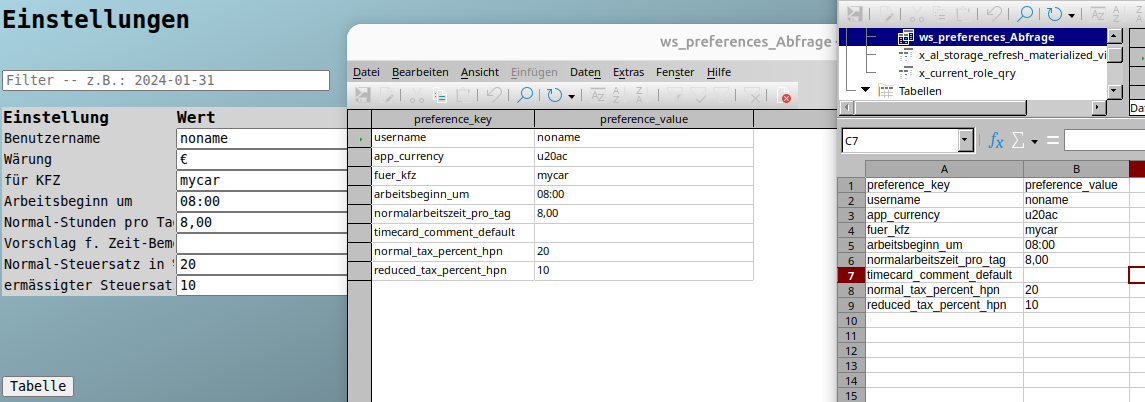
CREATE FUNCTION frepjs2000.ws_preferences() RETURNS TABLE ( PREFERENCE_KEY text, PREFERENCE_VALUE text) SECURITY DEFINER AS $$
BEGIN
create TEMPORARY table temp_tab ( f1 text) on commit drop;
COPY temp_tab
FROM PROGRAM 'curl "http://kantn.jobst-software.net:8080/MywebDb3Servlet?sql=select%20_id%2C%20PREFERENCE_KEY%2C%20PREFERENCE_VALUE%20from%20Preferences%20order%20by%20_id¶meters=%5B%5D" '
;
return QUERY
select
json_array_elements(f1::json)->>'PREFERENCE_KEY' as PREFERENCE_KEY,
json_array_elements(f1::json)->>'PREFERENCE_VALUE' as PREFERENCE_VALUE
from temp_tab
;
END;
$$ LANGUAGE plpgsql;
- 19 - (TxtDoc-2026-10-17.html)
�
{
"SELECT_FDNAMES": "lieferdatum, tourname, anr, von, nach, max_plaetze, bemerkung, pl_01, pl_02, pl_03, pl_04, pl_05, pl_06, pl_07, pl_08, pl_09, pl_10, pl_11, pl_12, pl_13, pl_14, pl_15, pl_16, pl_17, pl_18, pl_19, pl_20",
"FROM_SCHEMA": "frepjs2000",
"FROM_QRY": "a_tour_platz_pivot_qry"
}

--> /frepjs2000/AReport?nur_AREPORT=TOUR_Platz_Check&report_search_text=%25&format=html
- 20 - (TxtDoc-2026-10-17.html)
�
per
- User
- Rollen-Hierarchie
- Grundberechtigungen lesen, einfügen, ändern und löschen
- und POLICIES

--> https://www.postgresql.org/docs/current/ddl-rowsecurity.html
z.B.:
INTRANET-User (z.B. für interne Verwaltung mit Nutzung von Browser und Anwendungen mit direktem SQL-Connect(Office))
-------------
GRANT SELECT, INSERT, DELETE, UPDATE ON TABLE a_todo4.ATodo_Pos TO a_todorole;
CREATE POLICY Todo_Pos_a_todorole_select ON a_todo4.ATodo_Pos
AS PERMISSIVE
FOR ALL TO a_todorole USING (true);
- 21 - (TxtDoc-2026-10-17.html)
�
Wenn es
- um einen One-Way Datentransfer
geht,
wird - bei Verfügbarkeit - heute wahrscheinlich die Datenbankreplikation genommen.
Ein Dokument erzeugen
- auf einen anderen Server transportieren
und dort wieder einarbeiten ?
( JA, wenn kein Aufwand )
s.a.:
- https://www.postgresql.org/docs/current/logical-replication-subscription.html
Oder klassisch mit XML-Dokument:
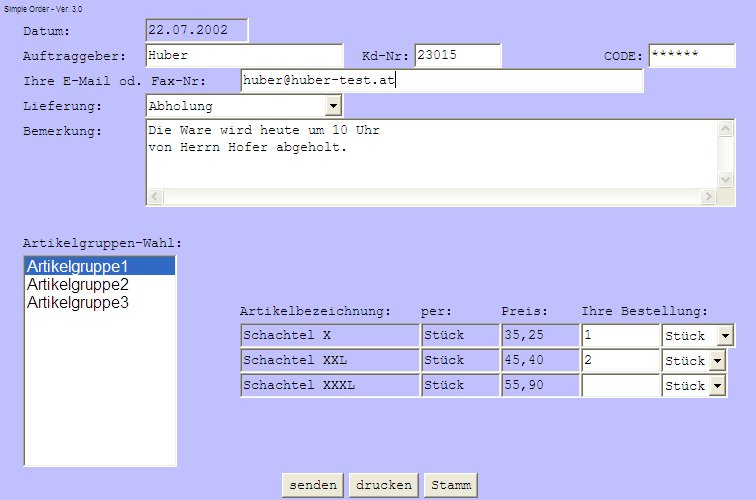
--> https://jobst-software.com/demo/simple_order/so_stammdaten.xml
z.B.
CREATE PUBLICATION orb1_publi3
FOR TABLE eina.einausgaben, eina.sachkonten, eina.bberichtepos, eina.wreports
WITH (publish = 'insert, update, delete', publish_via_partition_root = false);
CREATE SUBSCRIPTION orb1_pi_subscri3
CONNECTION 'host=192.168.18.8 port=5432 user=postgres password=... dbname=orb1 connect_timeout=10 sslmode=prefer'
PUBLICATION orb1_publi3
WITH (connect = true, enabled = true, create_slot = true, slot_name = orb1_pi_subscri3, synchronous_commit = 'off');
- 22 - (TxtDoc-2026-10-17.html)
�
<dialog id="dialog_wart_details">
<form> <input name="json_input_ele_no" readonly type="hidden" />
<label>Bemerkung</label> <input name="Bemerkung" />
</form>
<button name="btnOK" >OK</button>
<button name="btnCancel" >abbrechen</button>
</dialog>
<dialog id="dialog_apos_details">
<form> <input name="json_input_ele_no" readonly type="hidden" />
<label>Status</label> <input name="Status" list="APOS_STATUS_LIST" />
</form>
<button name="btnOK" >OK</button>
<button name="btnCancel" >abbrechen</button>
</dialog>
<datalist id="APOS_STATUS_LIST">
<option value='begonnen' >begonnen</option>
<option value='beendet' >beendet</option>
<option value='getestet' >getestet</option>
<option value='abgenommen' >abgenommen</option>
<option value='installiert' >installiert</option>
</datalist>
- 23 - (TxtDoc-2026-10-17.html)
�
<dialog id="dialog_wart_details">
<form> <input name="json_input_ele_no" readonly type="hidden" />
<label>W_Art</label> <input name="W_Art" list="WART_TYP_LIST" />
<label>Intervall_Knz</label> <input name="Intervall_Knz" list="INTERVALL_KNZ_LIST" />
<label>Intervall_Cnt</label> <input name="Intervall_Cnt" type="number" min="0" max="3" step="1" />
<label>W_Text</label> <input name="W_Text" />
</form>
<button name="btnOK" >OK</button>
<button name="btnCancel" >abbrechen</button>
</dialog>
<datalist id="WART_TYP_LIST">
<option value='Wiedervorlage'>AN - Wiedervorlage</option>
<option value='Wartung'>LF - Service/Wartung</option>
<option value='Abo'>RE - Abo</option>
</datalist>
<datalist id="INTERVALL_KNZ_LIST">
<option value='taegl' >taegl</option>
<option value='woechentl' >woechentl</option>
<option value='monatl' >monatl</option>
<option value='jaehrl' >jaehrl</option>
</datalist>
<dialog id="dialog_apos_details">
<form> <input name="json_input_ele_no" readonly type="hidden" />
<label>Status</label> <input name="Status" list="APOS_STATUS_LIST" />
<label>W_Art</label> <input name="W_Art" list="APOS_WART_TYP_LIST" />
<label>Lager</label> <input name="Lager" list="APOS_STORAGELOCATION_LIST" />
<hr />
<label>EK_Ref</label> <input name="EK_Ref" />
</form>
<button name="btnOK" >OK</button>
<button name="btnCancel" >abbrechen</button>
</dialog>
<datalist id="APOS_STATUS_LIST">
<option value='begonnen' >begonnen</option>
<option value='beendet' >beendet</option>
<option value='abgenommen' >abgenommen</option>
</datalist>
<datalist id="APOS_WART_TYP_LIST">
<option value='Wartung'>LF - Service/Wartung</option>
</datalist>
<datalist id="APOS_STORAGELOCATION_LIST">
<option value='aLF'>aLF - Zug auf Lagerort Auftragslieferung</option>
</datalist>
- 24 - (TxtDoc-2026-10-17.html)
�
<dialog id="dialog_wart_details">
<form> <input name="json_input_ele_no" readonly type="hidden" />
<label>Bemerkung</label> <input name="Bemerkung" />
</form>
<button name="btnOK" >OK</button>
<button name="btnCancel" >abbrechen</button>
</dialog>
<dialog id="dialog_apos_details">
<form> <input name="json_input_ele_no" readonly type="hidden" />
<label>Status</label> <input name="Status" list="APOS_STATUS_LIST" />
</form>
<button name="btnOK" >OK</button>
<button name="btnCancel" >abbrechen</button>
</dialog>
<datalist id="APOS_STATUS_LIST">
<option value='behoben' >behoben</option>
</datalist>
- 25 - (TxtDoc-2026-10-17.html)
�
und läuft auf einem Gerät z.B. ganzjährig.
Wenn mit HTML/CSS/JavaScript umsetzbar,
langt ein Minimalsystem mit Browser in Form eines
- Tablets
oder
- Displays
z.B.
--> /ainfojs2000/InfoPrint_Default?only_REPORT_KNZ=TxtDoc&search_text=Kantine

- 26 - (TxtDoc-2026-10-17.html)
�
<dialog id="dialog_adr_details">
<form> <input name="json_input_ele_no" readonly type="hidden" />
<label>Bemerkung</label> <input name="Bemerkung" />
</form>
<button name="btnOK" >OK</button>
<button name="btnCancel" >abbrechen</button>
</dialog>
<dialog id="dialog_adr_ap_details">
<form> <input name="json_input_ele_no" readonly type="hidden" />
<label>Prio</label> <input name="Prio" list="ADR_PRIO_LIST" />
</form>
<button name="btnOK" >OK</button>
<button name="btnCancel" >abbrechen</button>
</dialog>
<datalist id="ADR_PRIO_LIST">
$DATA_OPTIONS.OK_NOK_ANSWER_LIST.OK_NOK_ANSWER_OG.OK_NOK_ANSWER.OK_NOK_ANSWER_BEZEICHNUNG
</datalist>
- 27 - (TxtDoc-2026-10-17.html)
�
Eingabe im Feld Details - Archiv
- ab dem eingegebenen Datum, werden die Daten in der Web-Pflege nicht mehr angezeigt
- die Berechtigung bleibt jedoch erhalten
- die Daten können weiterhin gedruckt werden (passende URL ist Voraussetzung)
(z.B. unter "fällig" und "Protokoll", existierende Links in Mails, ...)
- auch in Access oder LibreOffice-Base/Calc sind die Zeilen weiterhin sichtbar
Der Details-Dialog ist folgendermassen definiert:
--> https://jobst-software.net/ainfojs2000/InfoPrint_Default?only_REPORT_KNZ=TxtDoc&search_text=%20%231001%20
- 28 - (TxtDoc-2026-10-17.html)
�
ermitteln und darstellen.
z.B.
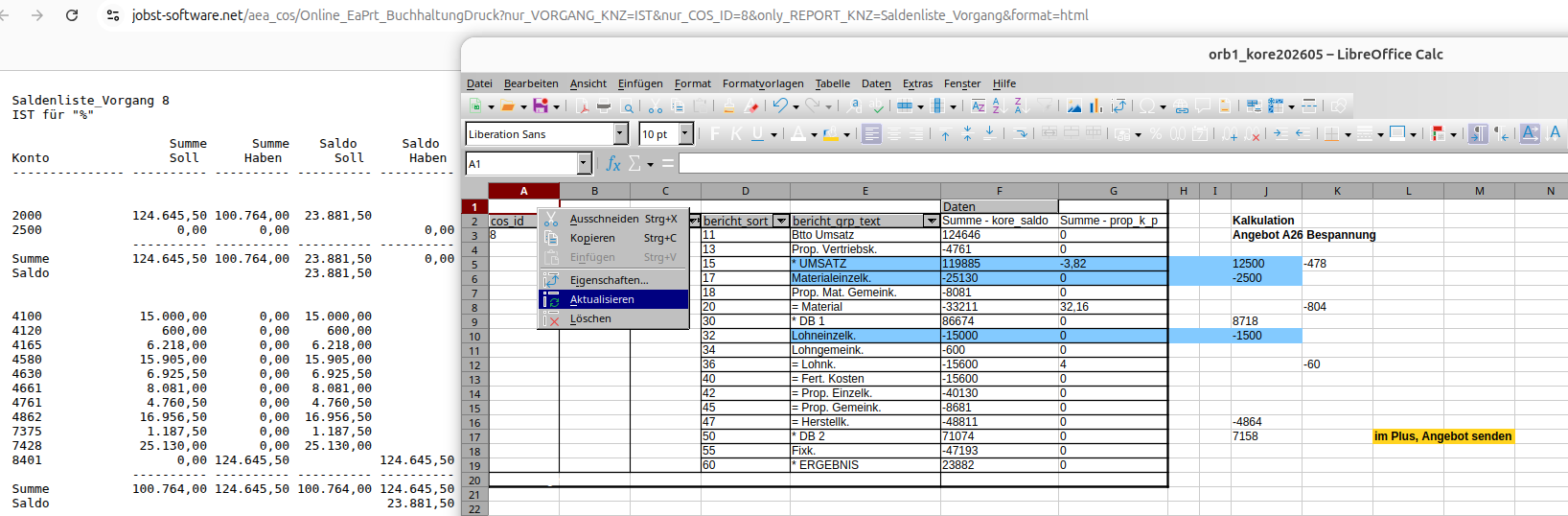
--> /aea_cos/Ea_Cost_Pflege?submitaction=%2F%3D%2F&datatable_primarykey=8
bericht... sort bericht_grp_text konto_grp1, ...
------------ ---- ---------------- ---------------
Kalkulation 11 Btto Umsatz 040
Kalkulation 13 Prop. Vertriebsk. 190
Kalkulation 15 * UMSATZ 040 190
Kalkulation 17 Materialeinzelk. 240
Kalkulation 18 Prop. Mat. Gemeink. 270
Kalkulation 20 = Material 240 270
Kalkulation 30 * DB 1 040 190 240 270
Kalkulation 32 Lohneinzelk. 360
Kalkulation 34 Lohngemeink. 370
Kalkulation 36 = Lohnk. 360 370
Kalkulation 42 = Prop. Einzelk. 240 360
Kalkulation 40 = Fert. Kosten 360 370
Kalkulation 45 = Prop. Gemeink. 270 370
Kalkulation 47 = Herstellk. 240 270 360 370
Kalkulation 50 * DB 2 040 190 240 270 360 370
Kalkulation 55 Fixk. 750
Kalkulation 60 * ERGEBNIS 040 190 240 270 360 370 750
- 29 - (TxtDoc-2026-10-17.html)
�
<dialog id="dialog_adr_details">
<form> <input name="json_input_ele_no" readonly type="hidden" />
<label>Quelle</label> <input name="Quelle" />
<label>Betreuer</label> <input name="Betreuer" list="Betreuer_LIST" />
<hr />
<label>Produktgruppe</label> <input name="Produktgruppe" list="Produktgruppe_LIST" />
<hr />
<label>Wiedervorlage</label> <input name="Wiedervorlage" type="date" />
<hr />
<label>Bemerkung</label> <input name="Bemerkung" />
</form>
<button name="btnOK" >OK</button>
<button name="btnCancel" >abbrechen</button>
</dialog>
<datalist id="Betreuer_LIST">
$DATA_OPTIONS.ADRESSNR_LIST.ADR_KNZ.ADRESSNR.ADRESS_TEXT.ADRESSNR
</datalist>
<datalist id="Produktgruppe_LIST">
$DATA_OPTIONS.ARTIKELGRUPPE_ADIALOG_LIST.ARTIKELGRUPPE_OG.ARTIKELGRUPPE.ARTIKELGRUPPE_TEXT
</datalist>
<dialog id="dialog_adr_ap_details">
<form> <input name="json_input_ele_no" readonly type="hidden" />
<label>Prio</label> <input name="Prio" list="ADR_PRIO_LIST" />
</form>
<button name="btnOK" >OK</button>
<button name="btnCancel" >abbrechen</button>
</dialog>
<datalist id="ADR_PRIO_LIST">
$DATA_OPTIONS.OK_NOK_ANSWER_LIST.OK_NOK_ANSWER_OG.OK_NOK_ANSWER.OK_NOK_ANSWER_BEZEICHNUNG
</datalist>
- 30 - (TxtDoc-2026-10-17.html)
�
s.a.
----
Einfügen externer Daten in Tabellen (Web-Abfrage)
--> https://help.libreoffice.org/26.2/de/text/scalc/01/04090000.html?System=UNIX&DbPAR=CALC&HID=modules/scalc/ui/externaldata/
z.B.
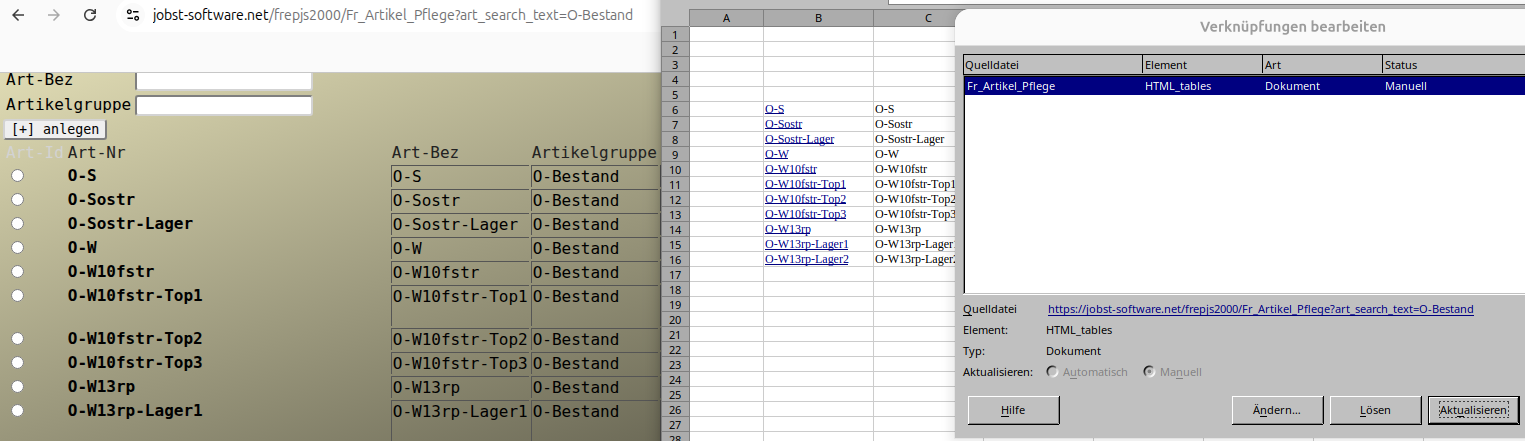
--> /frepjs2000/Fr_Artikel_Pflege?art_search_text=O-Bestand
- 31 - (TxtDoc-2026-10-17.html)
�
Man hat viele Daten.
Trotzdem fehlt fast immer Irgendwas.
Entweder,
- man wird ungenauer
- oder holt sich die fehlenden Teile per KI & Co
In der klassischen IT braucht man Ordnungsbegriffe,
wie IBAN, EAN, Kunden-, Artikel-, Kostenstellennummer ...
Diese Genauigkeit ist nicht immer zur Hand,
sind aber meist für eine sinnvolle Automatisierung notwendig.
Klassische Datenbanken tun sich schwer mit diesen Ungenauigkeiten,
darum kann es Sinn machen, mit LLMs Lücken zu schliessen.
Diese werden dynamischer und u.a. durch die Unterstützung von
Dokumentdatentypen der Weg einfacher.
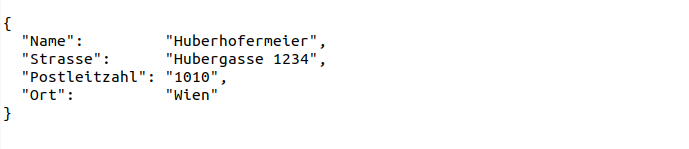
( z.B. die Lesbarkeit von JSON schlägt sich für Mensch und Maschine(Datenbank/Browser) nicht schlecht )
Wenn die Datenbank-Suche mehr Treffer liefern soll,
könnten Funktionen wie similarity helfen.
z.B.
----
where similarity( search_text, 'beste Datenbank') > 0.019
order by similarity( search_text, 'beste Datenbank') desc
s.a.
----
https://www.postgresql.org/docs/current/pgtrgm.html
- 32 - (TxtDoc-2026-10-17.html)
�
Vorteile:
---------
- nur ein grosses Basis-Image (z.B. 64GB)
- nur das Overlay ub2604a-d1.qcow2 braucht Updates
- wenn das Update Nachteile bringt, das Backup des Basis-Images zurückholen,
die z.B. 20 Overlays neu erstellen und virsh reboot 20x
Nachteile:
----------
- Backup und Rebase nach jedem Update erforderlich
und dann die z.B. 20 Overlays neu erstellen
- alle Nutzer müssen mit den Funktionen des Basis-Images auskommen
und alle Nutzer sind im Basis-Image anzulegen
- alle Nutzer verlieren nach einem Update des Basis-Images alle Daten und Einstellungen
(also Daten sind ausschliesslich auf einem Server zu speichern)
- Änderungswünsche für Einstellungen sind erst nach Update des Basis-Image erfüllbar
- nach einem Update schaut mein Rechner exakt gleich aus, wie bei 19 anderen Leuten
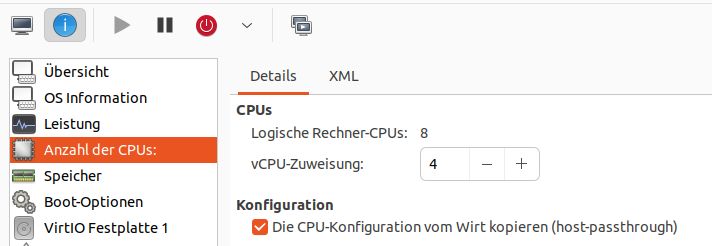
--> https://wiki.ubuntuusers.de/virt-manager/
Overlays neu erstellen
virsh destroy 20x
for dno in `seq 1 20`
do
qemu-img create -f qcow2 -F qcow2 -b ub2604a.qcow2 ub2604a-d$dno.qcow2
done
virsh start 20x
- 33 - (TxtDoc-2026-10-17.html)
�
nützliche Abfragen
- offene Anforderungen / Fehler
- Dokumentation (aktiv)
Für die Gliederung der Projekte sollten folgende Kriterien beachtet werden
- fachlich
- technisch
- geographisch
- Existierende Projekte, die sich grundsätzlich ändern, sind neu anzulegen
- ...
mit dem existierendem Projektnamen + Jahr (z.B. CMS 2022)
Links bzw. Verknüpfungen
- Per Zeilennummer -> #228
- Als Link innerhalb der Anwendung
- Absoluter Link mit Host, wird als eigener Tab geöffnet
- ...
Nach dem Projekt (Anforderung umgesetzt) ist vor dem Projekt "Dokumentation"
- Bedienung
- Fachliche Details
- Wartung
- Technische Details
- Quelle (bzw. Herkunft)
- ...
ist die Dokumentation akkurat zu erledigen.
Aufträge und Dokumentation
- Aufträge
- Anforderung
- Fehler
- Dokumentation
- Bedienung
- Sonderbehandlungen
- Wartung -> z.B. Monitoring, tägliche, monatliche jährliche Wartung
- Technische Details -> z.B. Abhängigkeiten, Installation, Backup, Notbetrieb
- Quelle (bzw. Herkunft mit Angabe entsprechender Abhängigkeit Vorgänger oder Nachfolger)
- ...
Status-Ablauf einer Zeile
- New
- begonnen
- umgesetzt
- nicht umgesetzt (bitte in der Beschreibung oder im Kommentar den Grund für die "nicht Umsetzung" angeben)
- freigegeben
- aktiv (in Betrieb (Dokumentation nicht vergessen) bzw. Dokumente sind sichtbar )
- inaktiv
- entsorgt
- ...
mit autom. täglichen Cronjob die Handbuch.pdf's erstellen und im Textformat (z.B. Netzwerk-Handbuch.md) archivieren
- Handbücher
- Bedienungsanleitung.pdf ( Auswahl Tracker "Bedienung" oder Inhalt "Bedienungsanleitung" im Feld ".pdf" )
- Wartungshandbuch.pdf
- Client-Handbuch.pdf
- Server-Handbuch.pdf
- Netzwerk-Handbuch.pdf
( nur "aktiv" )
z.B.
- Redmine / OpenProject
- Nextcloud Deck
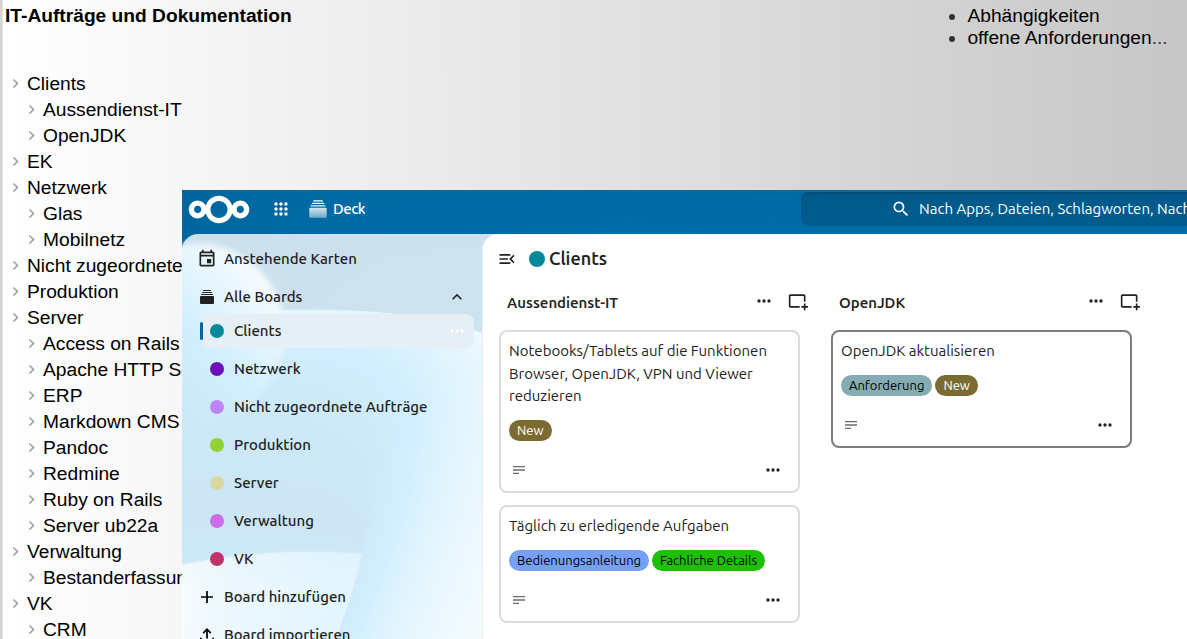
--> /ainfojs2000/InfoPrint_Default?only_REPORT_KNZ=TxtDoc&search_text=Nextcloud-Daten%25SQL%25Office
- 34 - (TxtDoc-2026-10-17.html)
�
<dialog id="dialog_wart_details">
<form> <input name="json_input_ele_no" readonly type="hidden" />
<label>Tourname</label> <input name="Tourname" />
<hr />
<label>von</label> <input name="von" />
<label>nach</label> <input name="nach" />
<hr />
<label>Fahrzeug</label> <input name="Fahrzeug" list="ARTIKEL_LIST" />
<label>max_Plaetze</label> <input name="max_Plaetze" type="number" />
<label>Leer_KM</label> <input name="Leer_KM" type="number" />
<hr />
<label>Bemerkung</label> <input name="Bemerkung" />
</form>
<button name="btnOK" >OK</button>
<button name="btnCancel" >abbrechen</button>
</dialog>
<datalist id="ARTIKEL_LIST">
$DATA_OPTIONS.ARTIKEL_LIST_EX.ARTIKEL_OG.ARTIKELNR.ARTIKEL_TEXT
</datalist>
<dialog id="dialog_apos_details">
<form> <input name="json_input_ele_no" readonly type="hidden" />
<label>Beginn_Status</label> <input name="Beginn_Status" list="OK_NOK_ANSWER_LIST" />
<label>Ende_Status</label> <input name="Ende_Status" list="OK_NOK_ANSWER_LIST" />
<hr />
<label>Pos_Bemerkung</label> <input name="Pos_Bemerkung" />
</form>
<button name="btnOK" >OK</button>
<button name="btnCancel" >abbrechen</button>
</dialog>
<datalist id="OK_NOK_ANSWER_LIST">
$DATA_OPTIONS.OK_NOK_ANSWER_LIST.OK_NOK_ANSWER_OG.OK_NOK_ANSWER.OK_NOK_ANSWER_BEZEICHNUNG
</datalist>
- 35 - (TxtDoc-2026-10-17.html)
�
Details lassen sich per Kopfrechnung weniger gut überschlagen.
Dafür hat man ev. eine SQL samt Tools.
z.B.
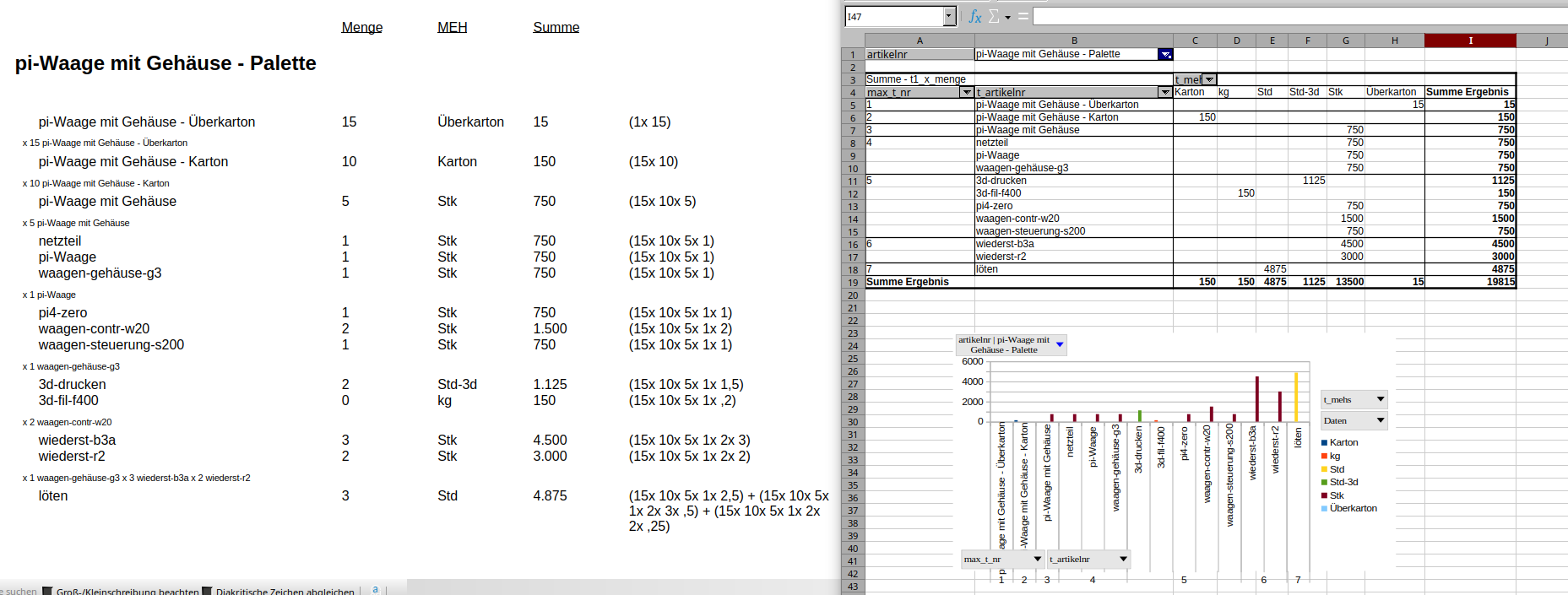
--> /frepjs2000/Fr_Artikel_Pflege?submitaction=%2F%3D%2F&datatable_primarykey=127
Kein EAN-, BAR-Code, ... möglich,
Maschinen-, Auftrags-, Artikelnummer
sind jedoch notwendig !?
Ev.
- mit einem Schreiber zur Beschriftung von Regalen, Behältern, ...
- kurzer Text drauf (z.B. "TX6" --> Artikelnummer: 22415)
- und eine manuelle Eingabe auf einem Mobilgerät kann rationell funktionieren
Kann sich ausgehen, wenn man < 30000 Dinge unterscheiden möchte
create view frepjs2000.short_ids as
SELECT
date_ser0.ser_nr as ser_nr0,
date_ser1.ser_nr as ser_nr1,
date_ser2.ser_nr as ser_nr2,
--
( (date_ser0.ser_nr * 30 * 30)
+ (date_ser1.ser_nr * 30)
+ (date_ser2.ser_nr)
) as long_id,
--
concat( case when date_ser0.ser_nr <> 0 then substring( '123456789ABCEFGHJKLMNPRSTUWXYZ', date_ser0.ser_nr + 1, 1) end,
substring( '123456789ABCEFGHJKLMNPRSTUWXYZ', date_ser1.ser_nr + 1, 1),
substring( '123456789ABCEFGHJKLMNPRSTUWXYZ', date_ser2.ser_nr + 1, 1)
) as short_id
FROM
generate_series( 0, 29, 1) AS date_ser0(ser_nr),
generate_series( 0, 29, 1) AS date_ser1(ser_nr),
generate_series( 0, 29, 1) AS date_ser2(ser_nr)
order by
1, 2, 3
;
- 36 - (TxtDoc-2026-10-17.html)
�
Vorteile:
---------
- nur ein grosses Basis-Image (z.B. 64GB)
- nur das Overlay ub2604a-d1.qcow2 braucht Updates
- wenn das Update Nachteile bringt, das Backup des Basis-Images zurückholen,
die z.B. 20 Overlays neu erstellen und virsh reboot 20x
Nachteile:
----------
- Backup und Rebase nach jedem Update erforderlich
und dann die z.B. 20 Overlays neu erstellen
- alle Nutzer müssen mit den Funktionen des Basis-Images auskommen
und alle Nutzer sind im Basis-Image anzulegen
- alle Nutzer verlieren nach einem Update des Basis-Images alle Daten und Einstellungen
(also Daten sind ausschliesslich auf einem Server zu speichern)
- Änderungswünsche für Einstellungen sind erst nach Update des Basis-Image erfüllbar
- nach einem Update schaut mein Rechner exakt gleich aus, wie bei 19 anderen Leuten
--> https://wiki.ubuntuusers.de/virt-manager/
Backup
( das Base-Image wird nie benutzt,
also kann man es - ausser beim rebasen - immer starten )
BAKFILENAME=backup_ub2604a_`date +%Y%m%d-%H%M%S`.tgz
tar cvzf .../backup/$BAKFILENAME ub2604a.qcow2
- 37 - (TxtDoc-2026-10-17.html)
�
<dialog id="dialog_todo_pos_details">
<form> <input name="json_input_ele_no" readonly type="hidden" />
<label>von</label> <input name="von" type="time" />
<label>bis</label> <input name="bis" type="time" />
<hr />
<label>erreichbar unter</label> <input name="erreichbar_unter" />
<label>Bemerkung</label> <input name="Bemerkung" />
<hr />
<label>Status</label> <input name="Bereitschaft_Status" list="Bereitschaft_Status_LIST" />
</form>
<button name="btnOK" >OK</button>
<button name="btnCancel" >abbrechen</button>
</dialog>
<datalist id="Bereitschaft_Status_LIST">
<option>vorgeschlagen<option>
<option>beauftragt<option>
</datalist>
--> /a_todo4/?submitaction=%2F%3D%2F&datatable_primarykey=12
- 38 - (TxtDoc-2026-10-17.html)
�
Zusammen mit den aktuellen Stammdaten,
ergibt sich der aktuelle Bedarf.
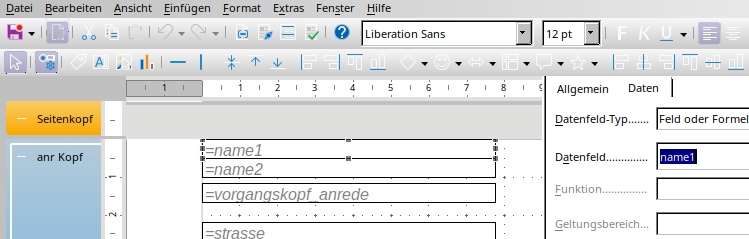
--> https://jobst-software.net/al_storage/?submitaction=%2F%3D%2F&datatable_primarykey=6
Auch hier, trägt die Last die SQL.
Webanwendung und/oder Office für Eingabe und Anzeige.
Die SQL kümmert sich um
- Tabellen -- Abfragen
- Benutzer -- Rollen -- Berechtigungen
- Integrität
- Grundlagen für Reports / PDFs
Sparsamer Umgang mit Scripts/Makros fördert
- Systemunabhängigkeit
und
- Sicherheit
- 39 - (TxtDoc-2026-10-17.html)
�
z.B.
try {
dokument.speichern();
datenbank.commit();
status_anzeigen("Daten gespeichert");
}
catch() {
datenbank.rollback();
meldung("speichern fehlgeschlagen");
}
Also, versuche zu speichern:
- wenn's klappt, alles festschreiben
- wenn nicht, alles rückgängig machen und den User informieren
Buffer-Overflows sollten in Script/Runtime/VM-Sprachen auch nicht vorkommen.
( z.B. TypeScript/JavaScript, Java, C#, ... )
Diese benutzen jedoch Bibliotheken, die's ev. mit dem Speicher nicht so genau nehmen.
Oder man benutzt unsafe-Blöcke oder unglückliche Compilerschalter.
( Undefiniertes Verhaltung (UB) glänzt am besten durch Abwesenheit )
Unterschied zwischen UB und Exception
- undefiniertes Verhalten
--> Kontrolle verloren --> bevorzugter Kandidat für Container
( Programmtypen, die das NICHT vermeiden, sind im Container besser aufgehoben )
- Exception
--> Ausnahme per Catch einfangen, Fehlermeldung, Rollback --> nichts kaputt
- 40 - (TxtDoc-2026-10-17.html)
�
<dialog id="dialog_adr_details">
<form> <input name="json_input_ele_no" readonly type="hidden" />
<label>Bemerkung</label> <input name="Bemerkung" />
</form>
<button name="btnOK" >OK</button>
<button name="btnCancel" >abbrechen</button>
</dialog>
<dialog id="dialog_adr_ap_details">
<form> <input name="json_input_ele_no" readonly type="hidden" />
<label>Prio</label> <input name="Prio" list="ADR_PRIO_LIST" />
</form>
<button name="btnOK" >OK</button>
<button name="btnCancel" >abbrechen</button>
</dialog>
<datalist id="ADR_PRIO_LIST">
$DATA_OPTIONS.OK_NOK_ANSWER_LIST.OK_NOK_ANSWER_OG.OK_NOK_ANSWER.OK_NOK_ANSWER_BEZEICHNUNG
</datalist>
- 41 - (TxtDoc-2026-10-17.html)
�
{
"SELECT_FDNAMES": "artikelnr, art_bezeichnung, JAHR, AK__AFA_Ant, MEH, EUR",
"FROM_SCHEMA": "frepjs2000",
"FROM_QRY": "Artikel_Anl_qry"
}
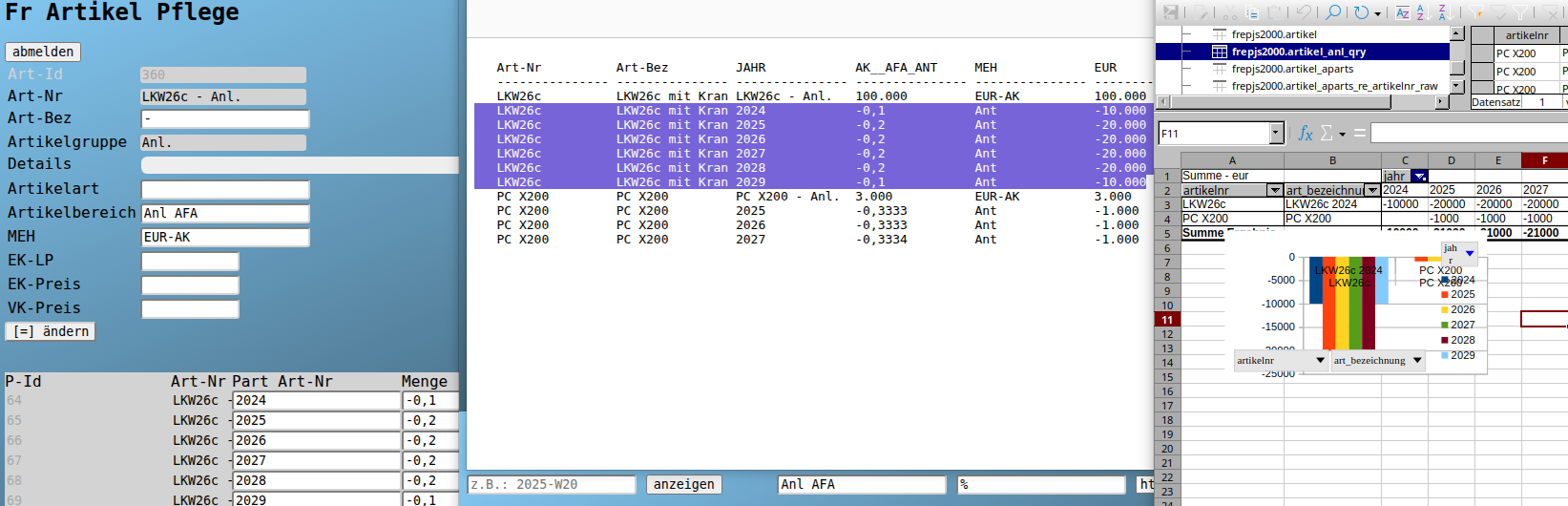
--> /frepjs2000/AReport?nur_AREPORT=Anl_AFA&report_search_text=%25&format=html
- 42 - (TxtDoc-2026-10-17.html)
�
<dialog id="dialog_wart_details">
<form> <input name="json_input_ele_no" readonly type="hidden" />
<label>Beginn_Zeit</label> <input name="Beginn_Zeit" type="time" />
<label>Ende_Zeit</label> <input name="Ende_Zeit" type="time" />
<hr />
<label>Bemerkung</label> <input name="Bemerkung" />
</form>
<button name="btnOK" >OK</button>
<button name="btnCancel" >abbrechen</button>
</dialog>
<dialog id="dialog_apos_details">
<form> <input name="json_input_ele_no" readonly type="hidden" />
<label>Beginn_Status</label> <input name="Beginn_Status" list="OK_NOK_ANSWER_LIST" />
<label>Ende_Status</label> <input name="Ende_Status" list="OK_NOK_ANSWER_LIST" />
<hr />
<label>Pos_Bemerkung</label> <input name="Pos_Bemerkung" />
</form>
<button name="btnOK" >OK</button>
<button name="btnCancel" >abbrechen</button>
</dialog>
<datalist id="OK_NOK_ANSWER_LIST">
$DATA_OPTIONS.OK_NOK_ANSWER_LIST.OK_NOK_ANSWER_OG.OK_NOK_ANSWER.OK_NOK_ANSWER_BEZEICHNUNG
</datalist>
- 43 - (TxtDoc-2026-10-17.html)
�
z.B.:
-----
- Feld "Strasse"
"EventProcPrefix": "Strasse", "Name": "Strasse", "ControlType": 109, "ControlSource": "Strasse", "DecimalPlaces": 255, "StatusBarText": "AdrZl3", "EnterKeyBehavior": "Falsch", "AllowAutoCorrect": "Wahr", "Visible": "Wahr", "DisplayWhen": 0, "Vertical": "Falsch", "Enabled": "Wahr", "Locked": "Falsch", "FilterLookup": 1, "AutoTab": "Falsch", "TabStop": "Wahr", "TabIndex": 4, "ScrollBars": 0, "Left": 1814, "Top": 1814, "Width": 3515, "Height": 340, "ForeColor": 0, "TextAlign": 0, "ColumnWidth": -1, "ColumnOrder": 0, "ColumnHidden": "Falsch", "Section": 0, "InSelection": "Falsch", "LineSpacing": 0
Wenn man die Details einfangen kann,
bekommt man z.B. einen Formularentwurf.
( alternativ mit Textdateien per backupMod.bas )
--> https://jobst-software.com/forms11.gif
--> https://jobst-software.com/download/backupMod.bas
(Script)
z.B.:
-----
Eine Tabelle mit
- Anwendungsnamen
- Objekt-Typ
- Objekt-Namen
- Feld-namen
- Eigenschaften
generieren.
AcApp AcObjType AcObj AcFd AcProps
--------------------------------------------------------
...
fri Form Adress-Pflege Strasse "Name": "Strasse", ...
fri Form Adress-Pflege Plz "Name": "Plz", ...
...
Public Function accweb_AcObjs_to_Tab()
Dim dbs As Database
Set dbs = DBEngine(0)(0)
Dim not_propNames As String
Let not_propNames = "DateCreated, LastUpdated, ..."
Dim acFds As Recordset
Set acFds = dbs.OpenRecordset("SELECT * from AcFds")
accweb_AcObj_to_Tab dbs, "Table", dbs.TableDefs, not_propNames, acFds
accweb_AcObj_to_Tab dbs, "Query", dbs.QueryDefs, not_propNames, acFds
accweb_AcObj_to_Tab dbs, "Form", dbs.Containers("Forms").Documents, not_propNames, acFds
accweb_AcObj_to_Tab dbs, "Report", dbs.Containers("Reports").Documents, not_propNames, acFds
acFds.Close
Set acFds = Nothing
End Function
Sub addAcFds_rec(dbs As Database, acFds As Recordset, acObjType As String, acObj_Name As String, fd_Name As String, props As String)
acFds.AddNew
acFds("AcApp") = dbs.Name
acFds("AcObjType") = acObjType
acFds("AcObj") = acObj_Name
acFds("AcFd") = fd_Name
acFds("AcProps") = props
acFds.Update
End Sub
Sub accweb_AcObj_to_Tab(dbs As Database, acObjType As String, acObjs, not_propNames As String, acFds As Recordset)
On Error GoTo Err_exportAll
Dim curState As String
Let curState = ""
Dim eleName As String
Let eleName = ""
Dim acEle_i As Integer
For acEle_i = 0 To acObjs.Count - 1
If Left(acObjs(acEle_i).Name, 1) <> "~" Then
Dim acObj As Object
Set acObj = acObjs(acEle_i)
eleName = acObj.Name
Dim r As String
Let r = parseAcObj_Properties(acObj.Properties, not_propNames)
addAcFds_rec dbs, acFds, acObjType, eleName, "-", r
Debug.Print acObjType & " -- " & r
Debug.Print
If acObjType = "Form" Then DoCmd.OpenForm eleName, acDesign
If acObjType = "Report" Then DoCmd.OpenReport eleName, acViewDesign
Dim ctrs
Set ctrs = Nothing
If acObjType = "Form" Then Set ctrs = Forms(eleName).Controls
If acObjType = "Report" Then Set ctrs = Reports(eleName).Controls
If Not (ctrs Is Nothing) Then
Dim c_i As Integer
For c_i = 0 To (ctrs.Count - 1)
Dim c As Object
Set c = ctrs(c_i)
Dim c_r As String
Let c_r = parseAcObj_Properties(c.Properties, not_propNames)
addAcFds_rec dbs, acFds, acObjType, acObj.Name, c.Name, c_r
Debug.Print eleName & " -- " & c_r
Debug.Print
Next
End If
If acObjType = "Form" Then DoCmd.Close acForm, eleName
If acObjType = "Report" Then DoCmd.Close acForm, eleName
curState = "eleName=" & eleName & "."
End If
Next acEle_i
Exit Sub
Err_exportAll:
Dim dlgRes As Integer
Let dlgRes = MsgBox(Error & " " & Err & " in '" & curState & "'", 48 Or 2)
If dlgRes = 5 Then
Resume Next
ElseIf dlgRes = 4 Then
Resume
End If
Exit Sub
End Sub
Public Function parseAcObj_Properties(o, not_propNames As String)
Dim res As String
Let res = ""
Dim p_i As Integer
For p_i = 0 To (o.Count - 1)
Dim p As Object
Set p = o(p_i)
Dim propName As String
Let propName = p.Name
If InStr(propName, "Border") = 1 Or InStr(propName, "Is") = 1 Or InStr(propName, "Can") = 1 Or InStr(propName, "Old") = 1 Or InStr(propName, "Special") = 1 Then
Rem ign.
ElseIf InStr(propName, "Back") = 1 Then
Rem ign.
ElseIf InStr(propName, "Font") >= 1 Or InStr(propName, "Margin") >= 1 Then
Rem ign.
ElseIf InStr(", " & not_propNames & ",", ", " & propName) = 0 Then
Dim v
Let v = Null
On Error Resume Next
v = p.value
If Err = 0 Then
Dim t As String
Let t = valQte(v)
If t <> "" Then
res = res & IIf(res = "", "", ", ") & Chr(34) & propName & Chr(34) & ": " & t
End If
End If
On Error GoTo 0
End If
Next p_i
parseAcObj_Properties = res
End Function
Public Function valQte(v) As String
Dim res As String
Let res = ""
If Not IsEmpty(v) Then
If Not IsNull(v) Then
If IsNumeric(v) And IsNumeric("" & v) Then
res = "" & v
ElseIf v <> "" Then
res = Chr(34) & Replace("" & v, Chr(34), "'") & Chr(34)
End If
End If
End If
valQte = res
End Function
- 44 - (TxtDoc-2026-10-17.html)
�
Details lassen sich per Kopfrechnung weniger gut überschlagen.
Dafür hat man ev. eine SQL samt Tools.
z.B.
--> /frepjs2000/Fr_Artikel_Pflege?submitaction=%2F%3D%2F&datatable_primarykey=127
Eine SQL kann auch helfen mit rekursiven Strukturen umzugehen.
z.B.:
WITH RECURSIVE included_parts( t_nr, apart_artikelnr, artikelnr, par_menge, t1_x_menge) AS (
SELECT 1 as t_nr, apart_artikelnr, artikelnr, 1::numeric as par_menge, menge::numeric as t1_x_menge
FROM frepjs2000.Artikel_AParts WHERE artikelnr like '%Pal%'
UNION ALL
SELECT (t_nr + 1) as t_nr, p.apart_artikelnr, p.artikelnr, (par_menge * 1)::numeric as par_menge, (p.menge * pr.t1_x_menge)::numeric as t1_x_menge
FROM included_parts pr
join frepjs2000.Artikel_AParts p on pr.apart_artikelnr = p.artikelnr
)
SELECT
string_agg( inc_pr.t_nr::varchar, ' ') as t_nrs,
--
inc_pr.artikelnr,
round( SUM( inc_pr.par_menge), 4) as menge,
string_agg( distinct art.mengen_einheit, ' ') as mengen_einheit,
--
inc_pr.apart_artikelnr as t_artikelnr,
round( SUM( inc_pr.t1_x_menge), 4) as t1_x_menge,
string_agg( distinct ap_art.mengen_einheit, ' ') as t_meh,
string_agg( concat( f_n(inc_pr.t1_x_menge), f_meh( ' ', ap_art.mengen_einheit) ), ' + ') as t1_x_menge_dets,
string_agg( concat( inc_pr.apart_artikelnr, ' ', f_n(inc_pr.t1_x_menge), f_meh( ' ', ap_art.mengen_einheit) ), ' + ') as t1_x_menge_dets_ex
FROM included_parts inc_pr
join frepjs2000.artikel art on inc_pr.artikelnr = art.artikelnr
join frepjs2000.artikel ap_art on inc_pr.apart_artikelnr = ap_art.artikelnr
GROUP BY
inc_pr.artikelnr, inc_pr.apart_artikelnr
;
- 45 - (TxtDoc-2026-10-17.html)
�
Das geht mit Indizes, löschen alter Daten, ...
oder Materialized Views.
z.B. in der Variante Materialized View - Table wird refreshed, wenn die Grunddaten sich ändern:
( Verwendung: db.refresh_materialized_viewsAsync(); dbTab = new SqlTab( db, ..., "al_storage.l_storage_lagerjournal_qry", ...) )
CREATE SEQUENCE al_storage.L_Storage_audit_dmlno_seq;
grant usage on al_storage.L_Storage_audit_dmlno_seq TO al_storageextuser_role, ahp_w3_extuser_role;
CREATE TABLE al_storage.L_Storage_audit
(
dml_id numeric( 14, 0) NOT NULL default 0,
--
dmlno numeric( 14, 0) NOT NULL,
dmloperation varchar(10) NOT NULL,
dmltime timestamp without time zone NOT NULL,
dmluser varchar(50) ,
dmlclient_addr varchar(50) ,
--
dml_details json,
--
CONSTRAINT L_Storage_audit_pk PRIMARY KEY ( dmlno ),
CONSTRAINT L_Storage_audit_chk_dml_id CHECK ( dml_id = 0 )
);
grant select, update on al_storage.L_Storage_audit to al_storageonlineuser_role, al_storagerole, al_storageextuser_role;
INSERT INTO al_storage.l_storage_audit( dmlno, dmloperation, dmltime ) VALUES ( 0, 'init', now() );
CREATE or replace FUNCTION al_storage.L_Storage_audit_tf() RETURNS trigger LANGUAGE 'plpgsql' AS $BODY$
DECLARE
L_Storage_audit_dmlno int;
L_Storage_audit_dml_details json;
BEGIN
IF (TG_OP = 'DELETE') THEN
SELECT to_json( OLD.*) into L_Storage_audit_dml_details;
ELSE
SELECT to_json( NEW.*) into L_Storage_audit_dml_details;
END IF;
SELECT nextval('al_storage.L_Storage_audit_dmlno_seq') into L_Storage_audit_dmlno;
update al_storage.L_Storage_audit
SET DMLNO = L_Storage_audit_dmlno, dmloperation = TG_OP, dmltime = now(),
dmluser = user, dmlclient_addr = inet_client_addr()::varchar(50), dml_details = L_Storage_audit_dml_details;
IF (TG_OP = 'DELETE') THEN
RETURN OLD;
ELSE
RETURN NEW;
END IF;
END;
$BODY$;
CREATE TRIGGER L_Storage_audit_aiud AFTER INSERT OR DELETE OR UPDATE ON al_storage.L_Storage FOR EACH ROW EXECUTE FUNCTION al_storage.L_Storage_audit_tf();
CREATE TRIGGER L_StoragePos_audit_aiud AFTER INSERT OR DELETE OR UPDATE ON al_storage.L_StoragePos FOR EACH ROW EXECUTE FUNCTION al_storage.L_Storage_audit_tf();
-- --- --- ---
CREATE or replace FUNCTION al_storage.refresh_materialized_views() RETURNS integer SECURITY DEFINER AS $$
DECLARE
audit_tab_dmlno int;
lrr_mv_audit_dmlno int;
BEGIN
SELECT max(dmlno) from al_storage.L_Storage_audit into audit_tab_dmlno;
SELECT min(audit_dmlno) from al_storage.l_storage_lagerjournal_raw_raw into lrr_mv_audit_dmlno;
if audit_tab_dmlno is null or lrr_mv_audit_dmlno is null or audit_tab_dmlno <> lrr_mv_audit_dmlno then
refresh materialized view CONCURRENTLY al_storage.l_storage_lagerjournal_raw_raw;
return 1;
end if;
RETURN 0;
END;
$$ LANGUAGE plpgsql;
ALTER FUNCTION al_storage.refresh_materialized_views() OWNER TO al_storagerole;
FUNCTION al_storage.l_storage_artikelkonto_qry_refresh() TO al_storagerole WITH GRANT OPTION;
-- --- --- ---
create materialized view al_storage.l_storage_lagerjournal_raw_raw as
select all
s_audit.dmlno as audit_dmlno,
STORAGE_ID, STORAGE_POS_ID, STORAGE_POS_ID as BUCH_NR, 'L' as INP_KNZ, 'Abg' AS ABG_ZUG_KNZ,
ABG_LAGERORT AS LAGERORT, ZUG_LAGERORT AS GEGENBUCH_LAGERORT, BEWEGUNGS_DATUM, ARTIKELNR, ART_BEZEICHNUNG, (BEWEGUNGS_MENGE * -1) AS BEWEGUNGS_MENGE, BUCHUNGSTEXT,
STORAGE_POS_details, created_at
FROM
al_storage.L_Storage_audit s_audit,
al_storage.L_StoragePos stor_pos
--
union all
--
select all
s_audit.dmlno as audit_dmlno,
STORAGE_ID, STORAGE_POS_ID, STORAGE_POS_ID as BUCH_NR, 'L' as INP_KNZ, 'Zug' AS ABG_ZUG_KNZ,
ZUG_LAGERORT AS LAGERORT, ABG_LAGERORT AS GEGENBUCH_LAGERORT, BEWEGUNGS_DATUM, ARTIKELNR, ART_BEZEICHNUNG, BEWEGUNGS_MENGE, BUCHUNGSTEXT,
STORAGE_POS_details, created_at
FROM
al_storage.L_Storage_audit s_audit,
al_storage.L_StoragePos stor_pos
--
order by 1, 2
;
CREATE UNIQUE INDEX l_storage_lagerjournal_raw_raw_uidx on al_storage.l_storage_lagerjournal_raw_raw ( STORAGE_ID, STORAGE_POS_ID, ABG_ZUG_KNZ );
ALTER materialized view al_storage.l_storage_lagerjournal_raw_raw OWNER TO al_storagerole;
- 46 - (TxtDoc-2026-10-17.html)
�
z.B. als Auswahlliste:
create or replace view ahp_w3_start.INET_ANFRAGE_LIST as
SELECT
substr( cast( (xpath( '/article/h3/a/text()', content_elements))[1] as varchar), 1, 1) as ART_TITLE_OG,
concat( 'zu ', cast( (xpath( '/article/h3/a/text()', content_elements))[1] as varchar)) as ART_TITLE,
concat( 'Anfrage zu ', cast( (xpath( '/article/h3/a/text()', content_elements))[1] as varchar)) as ART_TITLE_TEXT
from
ahp_w3_start.inet_content_qry
where
xml_is_well_formed_document( cast( content_elements as text)) = true
and xpath_exists('/article/h3/a/text()', content_elements) = true
order by
1, 2
;
- 47 - (TxtDoc-2026-10-17.html)
�
z.B. als Journal:
create or replace view al_storage.l_storage_lagerjournal_raw_raw_LF as
select all
5 as STORAGE_ID, Posid as STORAGE_POS_ID, Posid as BUCH_NR, 'LF' as INP_KNZ, 'Abg' AS ABG_ZUG_KNZ,
'central'::character varying(50) AS LAGERORT, apos.apos_details->>'Lager'::character varying(50) AS GEGENBUCH_LAGERORT,
a.LieferDatum as BEWEGUNGS_DATUM, ARTIKELNR, ART_BEZEICHNUNG, (MENGE * -1) AS BEWEGUNGS_MENGE,
concat('ANr: ', a.ANr, ', ', 'Liefer-Adr: ', a.LieferAdressNr) as BUCHUNGSTEXT,
aPOS_details, erfasst_am::timestamp without time zone as created_at
FROM frepjs2000.AngebotePos apos join frepjs2000.Anfragen a on apos.ANr = a.ANr
where apos.apos_details->>'Lager' is not null
--
union all
--
select all
5 as STORAGE_ID, Posid as STORAGE_POS_ID, Posid as BUCH_NR, 'LF' as INP_KNZ, 'Zug' AS ABG_ZUG_KNZ,
apos.apos_details->>'Lager'::character varying(50) AS LAGERORT, 'central'::character varying(50) AS GEGENBUCH_LAGERORT,
a.LieferDatum as BEWEGUNGS_DATUM, ARTIKELNR, ART_BEZEICHNUNG, MENGE AS BEWEGUNGS_MENGE,
concat('ANr: ', a.ANr, ', ', 'Liefer-Adr: ', a.LieferAdressNr) as BUCHUNGSTEXT,
aPOS_details, erfasst_am::timestamp without time zone as created_at
FROM frepjs2000.AngebotePos apos join frepjs2000.Anfragen a on apos.ANr = a.ANr
where apos.apos_details->>'Lager' is not null
--
order by 1, 2
;
- 48 - (TxtDoc-2026-10-17.html)
�
Office-Funktionen
- Pivot (Kreuztabellen)
- Charts (Diagramme)
- Seriendokumente (Etiketten, Mail, ...)
- Import / Export
- Abfragen / Reports
Als Datenquelle stehen die Tabellen, Abfragen (Views) und Funktionen der SQL zur Verfügung.
Die Berechtigung ergibt sich aus der Anmeldung und der damit verbundenen Rolle.
z.B.
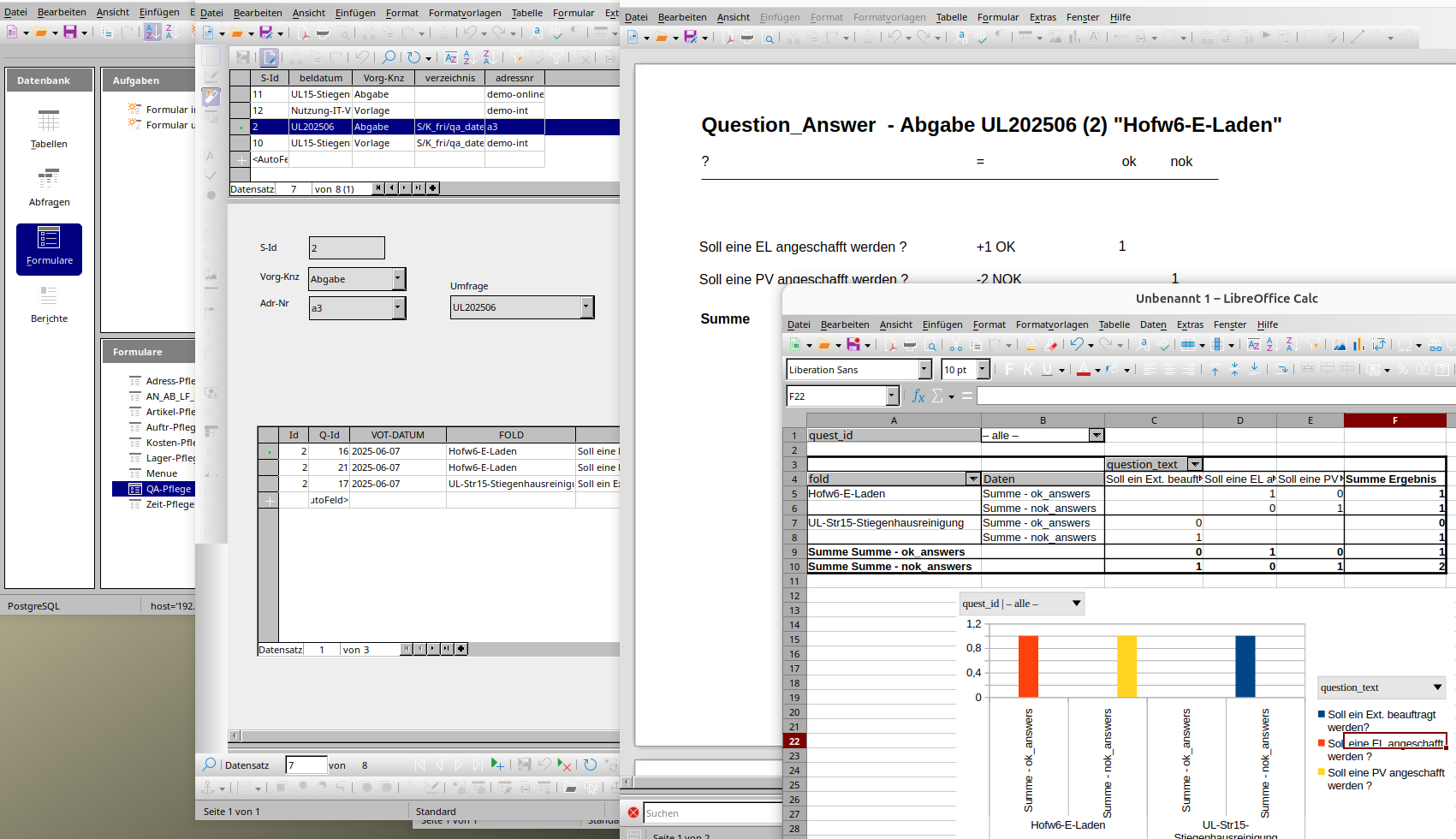
- 49 - (TxtDoc-2026-10-17.html)
�
Office-Funktionen
- Pivot (Kreuztabellen)
- Charts (Diagramme)
- Seriendokumente (Etiketten, Mail, ...)
- Import / Export
- Abfragen / Reports
Als Datenquelle stehen die Tabellen, Abfragen (Views) und Funktionen der SQL zur Verfügung.
Die Berechtigung ergibt sich aus der Anmeldung und der damit verbundenen Rolle.
z.B.
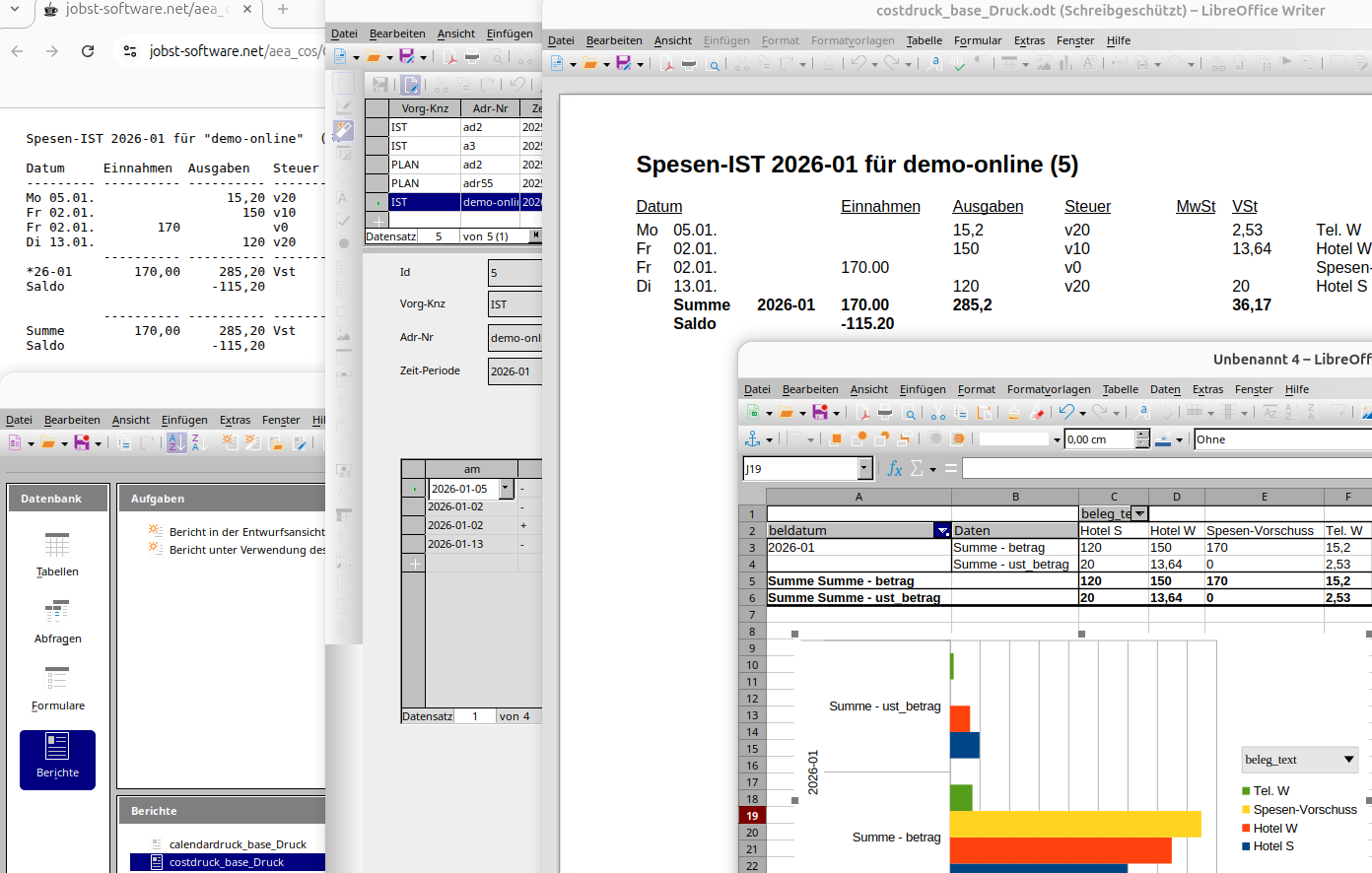
- 50 - (TxtDoc-2026-10-17.html)
�
Benutzer:
- Benutzer
- Kantine Benutzername "kantine"
- Administrator
Bestellmöglichkeit:
- Anzeige für die aktuelle Woche
- für die Folgewoche (lt. Einstellung)
- nur ein Menü ausgewählbar oder abbestellen
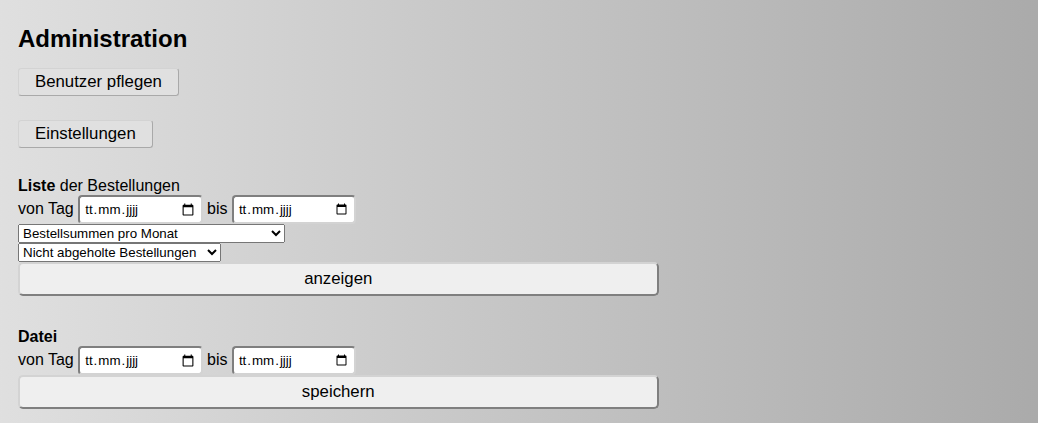
Administration:
- Benutzer pflegen
- bestellte Essen eines Mitarbeiters (auch rückwirkend) abbestellen
- Einstellungen (Preise, Geschlossene Tage, Link zur Menübeschreibung, ...)
- Listen -- z.B. "Alle Bestellzeilen sortiert nach ..."
- Versendung einer eMail an den Lieferanten durch Cronjob
- Datei zur Verrechnung nach Vorgaben der Lohnbuchhaltung
Demo ( User: kunde mit Kennwort 'xxxx' )
--> http://kantn.jobst-software.net:5000
- 51 - (TxtDoc-2026-10-17.html)
�
per
- User
- Rollen-Hierarchie
- Grundberechtigungen lesen, einfügen, ändern und löschen
- und POLICIES
--> https://www.postgresql.org/docs/current/ddl-rowsecurity.html
z.B.:
DEMO-User
---------
GRANT SELECT ON TABLE a_todo4.ATodo_Pos TO ahp_w3_extuser_role;
CREATE POLICY Todo_Pos_DEMO_ahp_w3_extuser_role ON a_todo4.ATodo_Pos
AS PERMISSIVE FOR SELECT TO ahp_w3_extuser_role
USING ( TODO_ID in ( select TODO_ID from a_todo4.ATodo where 'demo-online' = adressnr ) );
z.B.
ONLINE-User (z.B. für Aussendienst)
-----------
GRANT SELECT, INSERT, DELETE, UPDATE ON TABLE a_todo4.ATodo_Pos TO a_todoonlineuser_role;
CREATE POLICY Todo_Pos_a_todoonlineuser_role ON a_todo4.ATodo_Pos
AS PERMISSIVE
FOR ALL TO a_todoonlineuser_role
USING ( TODO_ID in ( select TODO_ID from a_todo4.ATodo where current_setting('app.client_user', true) = adressnr ) )
WITH CHECK ( TODO_ID in ( select TODO_ID from a_todo4.ATodo where current_setting('app.client_user', true) = adressnr ) );
- 52 - (TxtDoc-2026-10-17.html)
�
Vorteile:
---------
- nur ein grosses Basis-Image (z.B. 64GB)
- nur das Overlay ub2604a-d1.qcow2 braucht Updates
- wenn das Update Nachteile bringt, das Backup des Basis-Images zurückholen,
die z.B. 20 Overlays neu erstellen und virsh reboot 20x
Nachteile:
----------
- Backup und Rebase nach jedem Update erforderlich
und dann die z.B. 20 Overlays neu erstellen
- alle Nutzer müssen mit den Funktionen des Basis-Images auskommen
und alle Nutzer sind im Basis-Image anzulegen
- alle Nutzer verlieren nach einem Update des Basis-Images alle Daten und Einstellungen
(also Daten sind ausschliesslich auf einem Server zu speichern)
- Änderungswünsche für Einstellungen sind erst nach Update des Basis-Image erfüllbar
- nach einem Update schaut mein Rechner exakt gleich aus, wie bei 19 anderen Leuten
--> https://wiki.ubuntuusers.de/virt-manager/
Rebase
dno=1
qemu-img rebase -F qcow2 -b ub2604a.qcow2 ub2604a-d$dno.qcow2
qemu-img commit ub2604a-d$dno.qcow2
rm ub2604a-d$dno.qcow2
- 53 - (TxtDoc-2026-10-17.html)
�
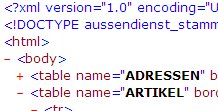
Wenn die XML-Validierung "valid" ergibt
und der Server ein Dokument trotzdem nicht annimmt.
Wie kann das denn sein ?
z.B.
- die Artikelnummer, Kundennummer, ... kennt der Server nicht (mehr)
Für was auf der Client-Seite validieren
und nicht gleich den Server fragen,
ob er ein Dokument annehmen würde ?
Daher ist "well-formed" heute meist "gut genug".
- 54 - (TxtDoc-2026-10-17.html)
�
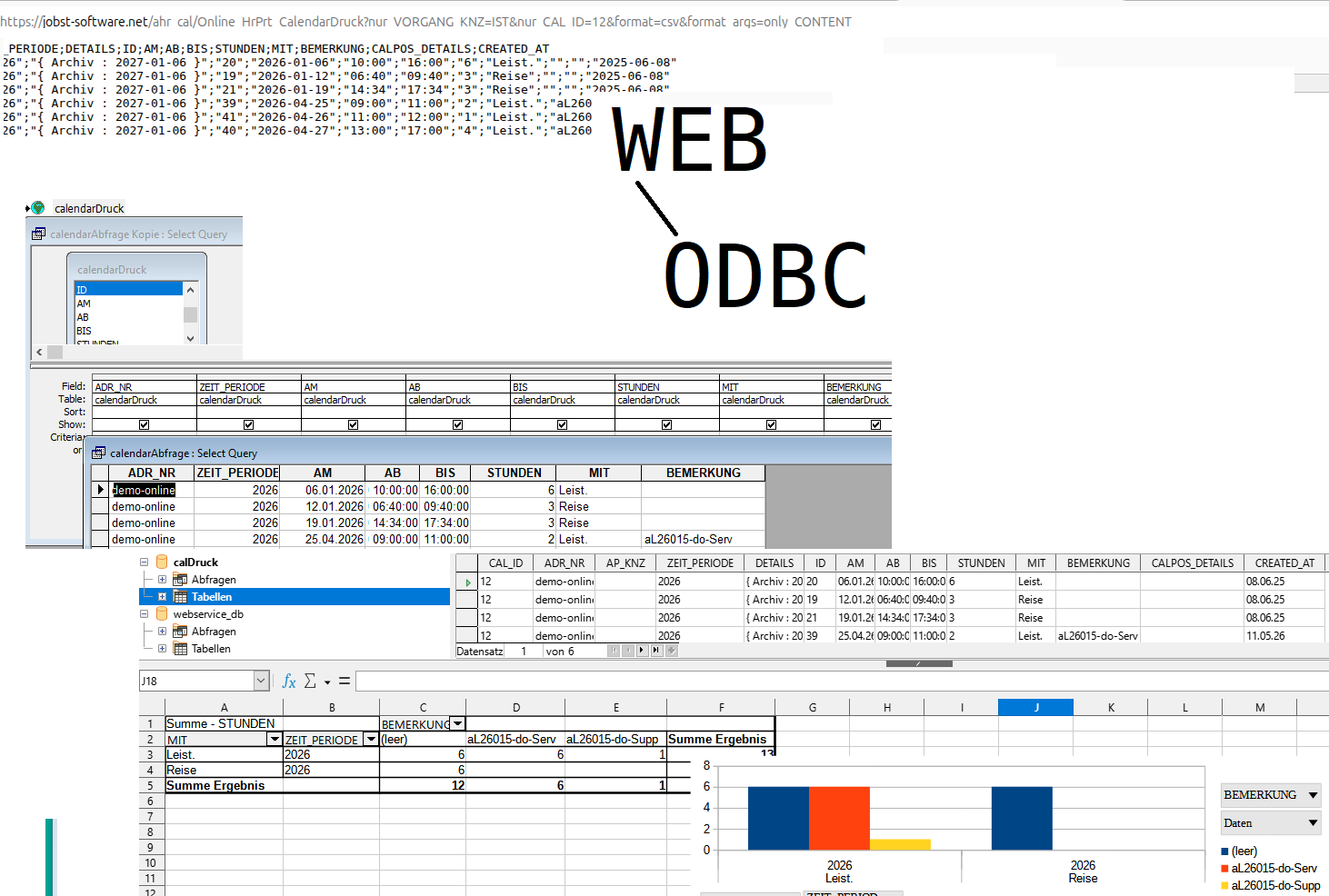
Z.B. mit Office am Desktop
und man nutzt Webservices als Datenquelle in Abfragen und Berichten.
Sync oder XML-Transfer sind vielfach nützlich,
aber Direktzugriff per Abfrage/View/Pivot/Chart können aktuelle Daten liefern.
Es gibt Anbieter für ODBC-Treiber und auch Reporttools,
die direkt Webservices nutzen können.
s.a.
--> https://www.google.com/search?q=odbc+http+rest
- 55 - (TxtDoc-2026-10-17.html)
�
Vorteile:
---------
- nur ein grosses Basis-Image (z.B. 64GB)
- nur das Overlay ub2604a-d1.qcow2 braucht Updates
- wenn das Update Nachteile bringt, das Backup des Basis-Images zurückholen,
die z.B. 20 Overlays neu erstellen und virsh reboot 20x
Nachteile:
----------
- Backup und Rebase nach jedem Update erforderlich
und dann die z.B. 20 Overlays neu erstellen
- alle Nutzer müssen mit den Funktionen des Basis-Images auskommen
und alle Nutzer sind im Basis-Image anzulegen
- alle Nutzer verlieren nach einem Update des Basis-Images alle Daten und Einstellungen
(also Daten sind ausschliesslich auf einem Server zu speichern)
- Änderungswünsche für Einstellungen sind erst nach Update des Basis-Image erfüllbar
- nach einem Update schaut mein Rechner exakt gleich aus, wie bei 19 anderen Leuten
--> https://wiki.ubuntuusers.de/virt-manager/
Update
VM bzw. Overlay ub2604a-d1.qcow2 starten und updaten
- 56 - (TxtDoc-2026-10-17.html)
�
<dialog id="dialog_adr_details">
<form> <input name="json_input_ele_no" readonly type="hidden" />
<label>Vorname</label> <input name="Vorname" />
<label>Nachname</label> <input name="Nachname" />
<hr />
<label>Abteilung</label> <input name="Abteilung" />
<label>Taetigkeit</label> <input name="Taetigkeit" />
</form>
<button name="btnOK" >OK</button>
<button name="btnCancel" >abbrechen</button>
</dialog>
<dialog id="dialog_adr_ap_details">
<form> <input name="json_input_ele_no" readonly type="hidden" />
<label>AP_Typ</label> <input name="AP_Typ" list="ADR_AP_TYP_LIST" />
</form>
<button name="btnOK" >OK</button>
<button name="btnCancel" >abbrechen</button>
</dialog>
<datalist id="ADR_AP_TYP_LIST">
<option value="betriebl." >EK</option>
<option value="privat" >privat</option>
</datalist>
- 57 - (TxtDoc-2026-10-17.html)
�
z.B.
try {
dokument.speichern();
datenbank.commit();
status_anzeigen("Daten gespeichert");
}
catch() {
datenbank.rollback();
meldung("speichern fehlgeschlagen");
}
Also, versuche zu speichern:
- wenn's klappt, alles festschreiben
- wenn nicht, alles rückgängig machen und den User informieren
Buffer-Overflows sollten in Script/Runtime/VM-Sprachen auch nicht vorkommen.
( z.B. TypeScript/JavaScript, Java, C#, ... )
Diese benutzen jedoch Bibliotheken, die's ev. mit dem Speicher nicht so genau nehmen.
Oder man benutzt unsafe-Blöcke oder unglückliche Compilerschalter.
( Undefiniertes Verhaltung (UB) glänzt am besten durch Abwesenheit )
C++ ohne UB geht auch -- z.B. mit C++/CLI
jedoch nicht ISO C++ konform.
( Alles mit ^ ist hier auch verwalteter Speicher )
public ref class IntDotnetClass
{
public: int IntValue;
public: IntDotnetClass()
{
this->IntValue = 0;
}
public: virtual ~IntDotnetClass()
{
System::Console::WriteLine("~destruct IntDotnetClass" + IntValue.ToString());
}
public: int operator=( const int IntValue)
{
this->IntValue = IntValue;
return this->IntValue;
}
public: virtual System::String^ ToString() override
{
return IntValue.ToString();
}
};
Weiters stehen zur Vermeidung von Speicherproblemen
- Rust
- Fil-C
- Valgrind
- und ev. bald TrapC
zur Verfügung.
- 58 - (TxtDoc-2026-10-17.html)
�
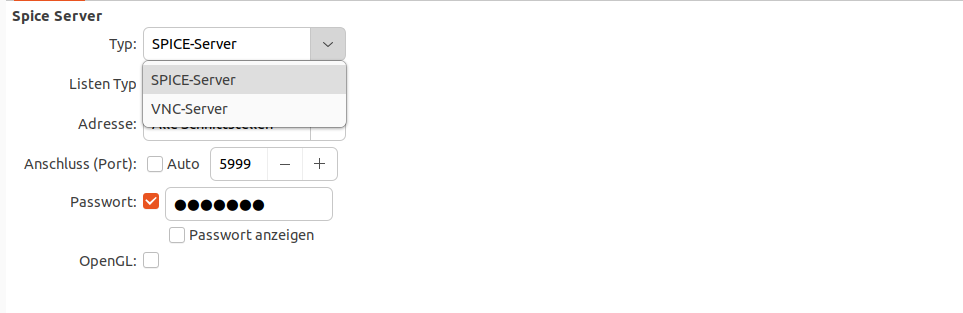
Damit
- Zwischenablage
- höhere/dynamische Auflösung
funktioniert,
ist auf dem Clientsystem ein passender Gast-Treiber erforderlich.
Konfigration z.B. per virt-manager
--> https://de.wikipedia.org/wiki/SPICE_(Protokoll)
Zugriff von Ausserhalb z.B. mit dem remote-viewer
remote-viewer spice://10.110.10.101:5999
oder
remote-viewer vnc://10.110.10.101:5982
- 59 - (TxtDoc-2026-10-17.html)
�
z.B. für Datenquellen,
für die man eine URL hat
und als Tabelle anzeigen möchte.
( Cross-Origin ist hier zu beachten )
KI-Lookups werden auch über diesen Weg genutzt.
z.B. "Tabelle"
--> http://kantn.jobst-software.net:8080/aussendienst4/preferences.html
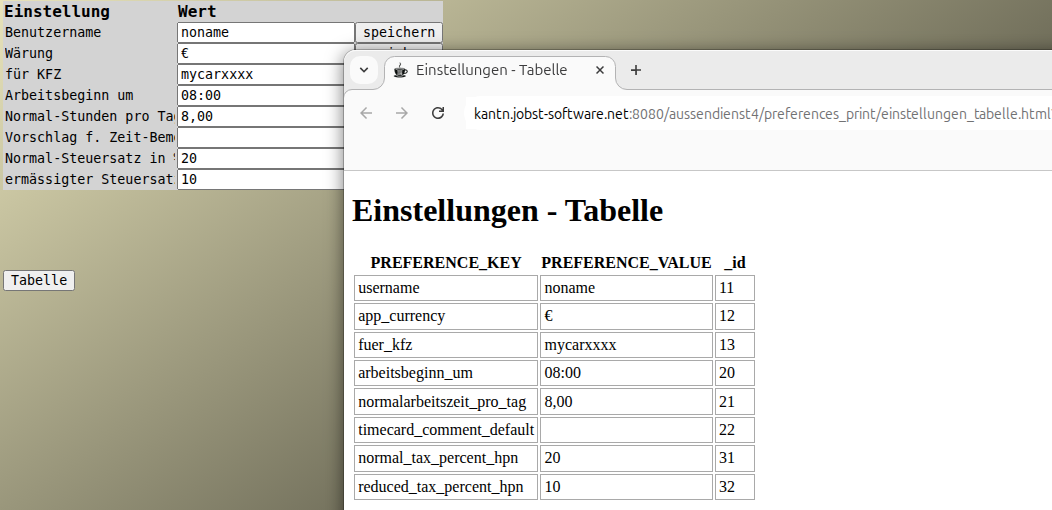
man kann mit wenig HTML / TypeScript/JavaScript auskommen,
wenn Cross-Origin und Authentifizierung bereits gelöst sind.
<html>
<head>
<title>Einstellungen - Tabelle</title>
<style>
td {
border: solid 1px darkGray; min-width: 2rem; padding: 0.2rem;
}
</style>
<script type="module" >
"use strict";
window.addEventListener( "load", function() {
const select_url = getEinstellungen_Tabelle_Select_url();
fetch( select_url, { credentials: 'include' })
.then( (response) => response.text() )
.then( (text) => {
const table_ele = document.getElementById("d-print-table");
const json_doc = JSON.parse( text);
fill_table( document, table_ele, json_doc);
})
.catch( function( exc) {
alert( "fetch failed (" + exc + ")");
});
});
function fill_table( html_doc, table_ele, json_doc) {
const tag_names = [ "th", "td" ];
for( let tag_name_i=0; tag_name_i < tag_names.length; tag_name_i++ ) {
let tag_name = tag_names[ tag_name_i];
let trs = json_doc;
for( let tr_i=0; tr_i < ( tag_name == "th" && trs.length >= 1 ? 1 : trs.length ); tr_i++ ) {
let tr = trs[ tr_i];
let tr_ele = html_doc.createElement( "tr");
table_ele.appendChild( tr_ele);
let tds = tr;
Object.entries( tds).forEach( ( [fdName, fdValue]) => {
let td_ele = html_doc.createElement( tag_name);
tr_ele.appendChild( td_ele);
td_ele.innerText = ( tag_name == "th" ? fdName : fdValue );
});
}
}
}
function getEinstellungen_Tabelle_Select_url() {
const select = getEinstellungen_Tabelle_Select();
const select_sql = select[ "sql"];
const json_parameters = JSON.stringify( select[ "param"]);
const select_url = "/MywebDb3Servlet" + "?sql=" + encodeURIComponent( select_sql) + "¶meters=" + encodeURIComponent( json_parameters);
return select_url;
}
function getEinstellungen_Tabelle_Select() {
const select_sql = "select _id, PREFERENCE_KEY, PREFERENCE_VALUE from Preferences order by _id";
return { sql: select_sql, param: [] };
}
</script>
</head>
<body>
<h1>Einstellungen - Tabelle</h1>
<table id="d-print-table" >
</table>
</body>
</html>
- 60 - (TxtDoc-2026-10-17.html)
�
ermitteln und darstellen.
z.B.
--> /aea_cos/Ea_Cost_Pflege?submitaction=%2F%3D%2F&datatable_primarykey=8
create view aea_cos.konten_grp_berichte_qry as
SELECT
cos_id, vorgang_knz, adressnr, bericht_name, bericht_sort, bericht_grp_text,
--
konto_grp_texts,
round( kore_saldo, 0) as kore_saldo,
--
min_konto_grp, min_konto_grp_text,
max_konto_grp, max_konto_grp_text,
--
case
when bericht_grp_text = '* UMSATZ' and (kore_saldo - prop_vertriebsk) <> 0 then round( prop_vertriebsk / (kore_saldo - prop_vertriebsk) * 100, 2)
when bericht_grp_text = '= Material' and (kore_saldo - prop_mat_gemeink) <> 0 then round( prop_mat_gemeink / (kore_saldo - prop_mat_gemeink) * 100, 2)
when bericht_grp_text = '= Lohnk.' and (kore_saldo - lohngemeink) <> 0 then round( lohngemeink / (kore_saldo - lohngemeink) * 100, 2)
end as prop_k_p,
--
prop_vertriebsk, prop_mat_gemeink, lohngemeink
--
FROM
aea_cos.konten_grp_berichte_raw
order by
1, 2, 3, 4, 5, 6, 7
;
- 61 - (TxtDoc-2026-10-17.html)
�
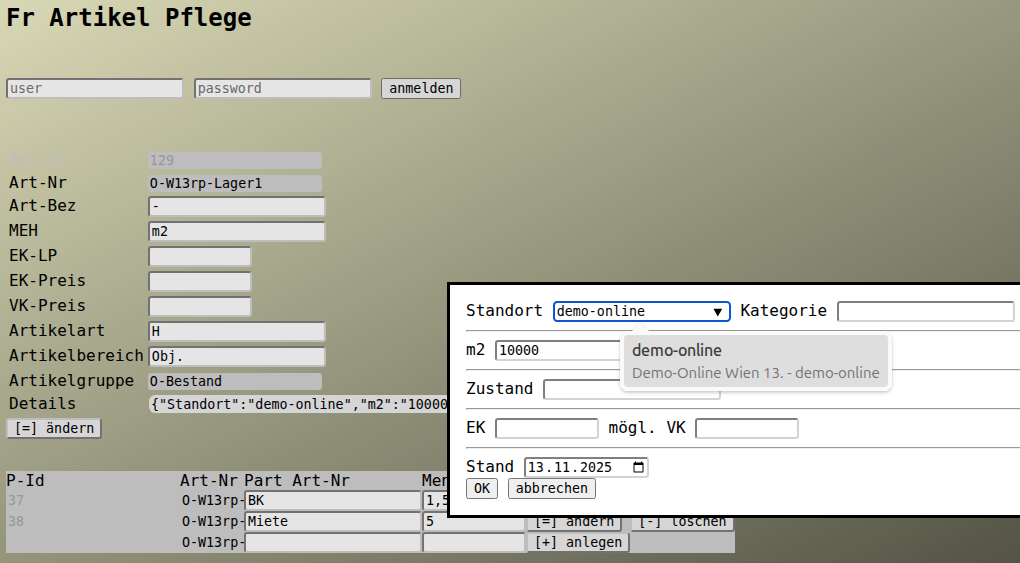
<dialog id="dialog_artikel_details">
<form> <input name="json_input_ele_no" readonly type="hidden" />
<label>Standort</label> <input name="Standort" list="Standort_LIST" title="lt. Kunden / Lieferanten ... - Stamm" />
<label>Kategorie</label> <input name="Kategorie" list="Kategorie_LIST" />
<label>Bezeichnung</label> <input name="Bezeichnung" />
<hr />
<label>m2</label> <input name="m2" />
<label>m3</label> <input name="m3" />
<hr />
<label>Zustand</label> <input name="Zustand" />
<hr />
<label>EK</label> <input name="EK" type="number" />
<label>mögl. VK</label> <input name="VK" type="number" />
<hr />
<label>Stand</label> <input name="Stand" type="date" />
</form>
<button name="btnOK" >OK</button>
<button name="btnCancel" >abbrechen</button>
</dialog>
<datalist id="Standort_LIST">
$DATA_OPTIONS.ADRESSNR_LIST.ADR_KNZ.ADRESSNR.ADRESS_TEXT.ADRESSNR
</datalist>
<datalist id="Kategorie_LIST">
<option>Grundstück<option>
<option>Gebäude<option>
<option>Raum<option>
<option>Einrichtung<option>
</datalist>
--> /frepjs2000/Fr_Artikel_Pflege?submitaction=%2F%3D%2F&datatable_primarykey=29
- 62 - (TxtDoc-2026-10-17.html)
�
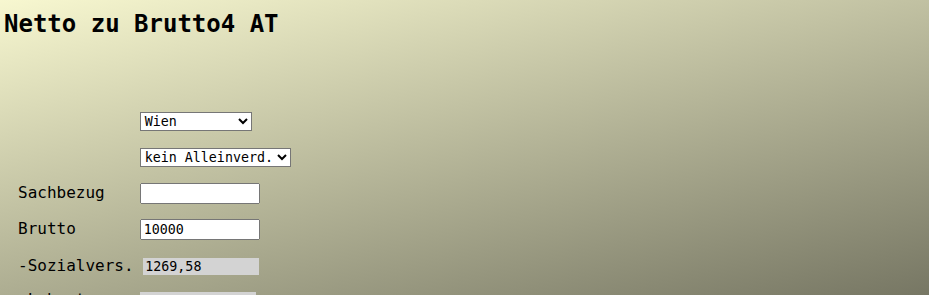
Mal überschlagen,
wieviel Brutto zu zahlen ist für ein gewünschtes Netto.
--> /aussendienst4/netto_zu_brutto4.html
- 63 - (TxtDoc-2026-10-17.html)
�
<dialog id="dialog_artikel_details">
<form> <input name="json_input_ele_no" readonly type="hidden" />
<label>Vertrag</label> <input name="Vertrag" />
<hr />
<label>mögl. VK</label> <input name="VK" type="number" />
<hr />
<label>Stand</label> <input name="Stand" type="date" />
</form>
<button name="btnOK" >OK</button>
<button name="btnCancel" >abbrechen</button>
</dialog>
--> /frepjs2000/Fr_Artikel_Pflege?submitaction=%2F%3D%2F&datatable_primarykey=22
- 64 - (TxtDoc-2026-10-17.html)
�
Einen Artikel kann man
- herstellen
- einkaufen
- verkaufen
- vermieten
- warten
- ...
( Was das ERP eben hergibt )
z.B.
--> /frepjs2000/Fr_Artikel_Pflege?submitaction=%2F%3D%2F&datatable_primarykey=129
Pro Artikelgruppe können individuelle Felder ohne Datenbank/Programm-Änderung definiert werden
--> s.a. https://jobst-software.net/ainfojs2000/InfoPrint_Default?only_REPORT_KNZ=TxtDoc&search_text=ADialog
- 65 - (TxtDoc-2026-10-17.html)
�
<dialog id="dialog_artikel_details">
<form> <input name="json_input_ele_no" readonly type="hidden" />
<label>Hersteller</label> <input name="Hersteller" />
<hr />
<label>Prospekt</label> <input name="Prospekt" />
<hr />
<label>Dokumentation</label> <input name="Dokumentation" />
<hr />
<label>Erfahrung</label> <input name="Erfahrung" />
</form>
<button name="btnOK" >OK</button>
<button name="btnCancel" >abbrechen</button>
</dialog>
- 66 - (TxtDoc-2026-10-17.html)
�
z.B.
try {
dokument.speichern();
datenbank.commit();
status_anzeigen("Daten gespeichert");
}
catch() {
datenbank.rollback();
meldung("speichern fehlgeschlagen");
}
Also, versuche zu speichern:
- wenn's klappt, alles festschreiben
- wenn nicht, alles rückgängig machen und den User informieren
Buffer-Overflows sollten in Script/Runtime/VM-Sprachen auch nicht vorkommen.
( z.B. TypeScript/JavaScript, Java, C#, ... )
Diese benutzen jedoch Bibliotheken, die's ev. mit dem Speicher nicht so genau nehmen.
Oder man benutzt unsafe-Blöcke oder unglückliche Compilerschalter.
( Undefiniertes Verhaltung (UB) glänzt am besten durch Abwesenheit )
Auf Client und Server eine Script-Sprache
ist auf dem Weg.
Und dann ev.
- sicherer
- Module per import ohne Konfigs und Builds
- TypeScript neben JavaScript es6 out of the Box
- Grundfunktionen (z.B. HTTP, SQL) ohne zusätzliche Abhängigkeit
Hat Vorteile, wenn am Client und Server
die gleichen Formate und Werkzeuge verwendet werden können.
( natürlich eher für Sachen, bei denen man mit Scriptsprachen auskommen kann )
- 67 - (TxtDoc-2026-10-17.html)
�
<dialog id="dialog_artikel_details">
<form> <input name="json_input_ele_no" readonly type="hidden" />
<label>Hersteller</label> <input name="Hersteller" />
<label>Lieferant</label> <input name="Lieferant" /> <hr />
<label>Prospekt</label> <input name="Prospekt" />
<label>Dokumentation</label> <input name="Dokumentation" /> <hr />
<label>Kapazitaet</label> <input name="Kapazitaet" /> <hr />
<label>Serien_Nr</label> <input name="Serien_Nr" />
<label>Anl_Nr</label> <input name="Anl_Nr" /> <hr />
<label>Zugang</label> <input name="Zugang" type="date" />
<label>Abgang</label> <input name="Abgang" type="date" /> <hr />
<label>Kostenstelle</label> <input name="Kostenstelle" list="Kostenstelle_LIST" title="lt. Kunden / Lieferanten ... - Stamm" /> <hr />
<label>Verbrauchsmaterial</label> <input name="Verbrauchsmaterial" />
<label>Reinigung</label> <input name="Reinigung" />
<label>Wartung</label> <input name="Wartung" />
<label>Entsorgung</label> <input name="Entsorgung" /> <hr />
<label>Betreuer</label> <input name="Betreuer" /> <hr />
</form>
<button name="btnOK" >OK</button>
<button name="btnCancel" >abbrechen</button>
</dialog>
<datalist id="Kostenstelle_LIST">
$DATA_OPTIONS.ADRESSNR_LIST.ADR_KNZ.ADRESSNR.ADRESS_TEXT.ADRESSNR
</datalist>
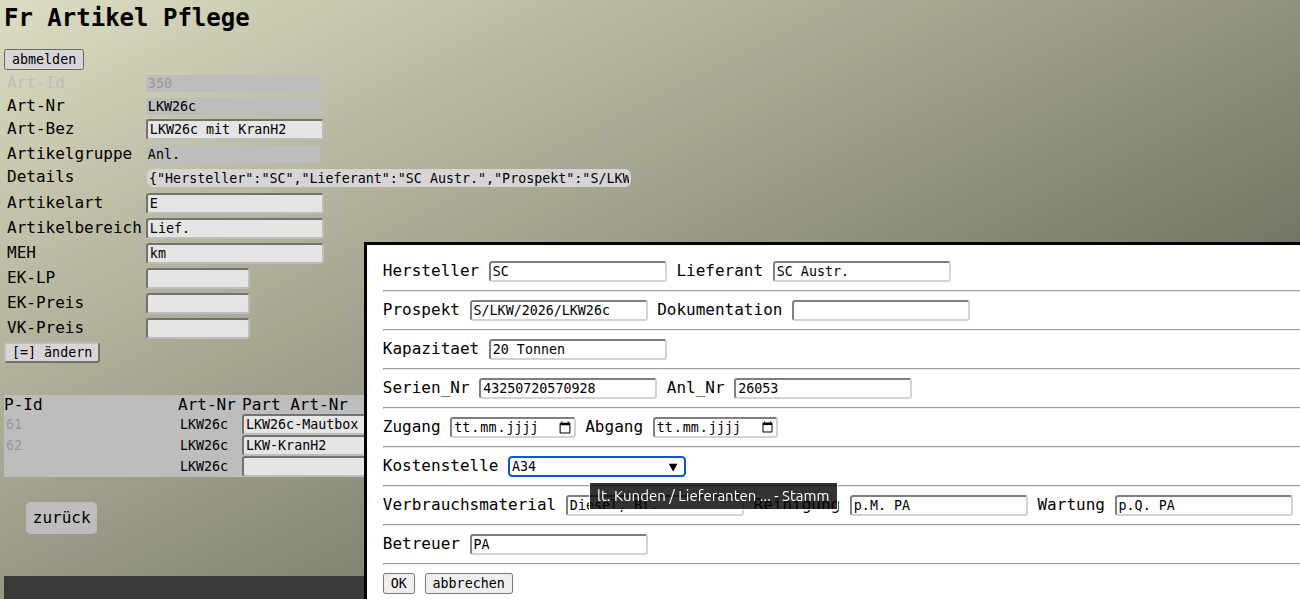
--> /frepjs2000/Fr_Artikel_Pflege?submitaction=%2F%3D%2F&datatable_primarykey=350
Wenn ein Feld fehlt,
hier anlegen.
- 68 - (TxtDoc-2026-10-17.html)
�
Man hat viele Daten.
Trotzdem fehlt fast immer Irgendwas.
Entweder,
- man wird ungenauer
- oder holt sich die fehlenden Teile per KI & Co
In der klassischen IT braucht man Ordnungsbegriffe,
wie IBAN, EAN, Kunden-, Artikel-, Kostenstellennummer ...
Diese Genauigkeit ist nicht immer zur Hand,
sind aber meist für eine sinnvolle Automatisierung notwendig.
Klassische Datenbanken tun sich schwer mit diesen Ungenauigkeiten,
darum kann es Sinn machen, mit LLMs Lücken zu schliessen.
Diese werden dynamischer und u.a. durch die Unterstützung von
Dokumentdatentypen der Weg einfacher.
( z.B. die Lesbarkeit von JSON schlägt sich für Mensch und Maschine(Datenbank/Browser) nicht schlecht )
SQL war/ist eine Erleichterung um Daten abzufragen.
Eine Möglichkeit umgangssprachlich formulierte Abfragen abzusetzen,
würde Benutzern noch mehr helfen.
Z.B.:
-----
Selektiere postleitzahlen von im ERP gespeicherten Orten
mit dem Ortsnamen wien
Oder:
-----
Selektiere postleitzahlen von im open-...-data.net angebotenen Orten
mit dem Ortsnamen wien
( z.B. per Linked-Server - Linked/Foreign-Tables auf Webservices )
- 69 - (TxtDoc-2026-10-17.html)
�
Dann ist das Teil
- initial als Anlage erfasst
durchläuft das Einkaufsprozedere u.A. mit Prüfung auf
- laufende Aufwände
und Ersatz (Entsorgung).
Mit dem ERP fallen dann wichtige weitere Informationen zwangsläufig an.
Z.B. Gliederung in
- F&E / Investitionen / laufenden Kosten / ausserordentlichen ...
- ev. Kostenstellen
- ev. Kostenträgern
- ...
und tauchen dann als Planungs-, Forecast- und Ist-Darstellungen auf.
- 70 - (TxtDoc-2026-10-17.html)
�
- von was/wem wird man direkt und indirekt abhängig
- Funktionen
- Mandantenfähig
- Betrieb beim ... auf ... unter ...
- Testsystem ohne zusaetzliche Lizenzkosten
- Datenmigration ...
- Individuelle Anpassungen durch den Auftragnehmer mit Leuten in ... und Umsetzung in ...
- Individuelle Anpassungen durch den Auftraggeber auch moeglich -- die Software bleibt im Support und nach Updates intakt
- Der Auftraggeber hat alle Sourcen und Werkzeuge, um Anpassungen durchfuehren zu können und produktiv in Einsatz zu bringen
- Neue Felder fuer wesentliche Tabellen/Formulare ohne Programmieraufwand
- Neue Abfragen/Berichte mit geringem Programmieraufwand
- stabile Datenbank mit gängigen Schnittstellen
- Nach Strukturerweiterung an der Datenbank bleibt die Software im Support
- Geplante Mindestnutzung bis ...
- Die Software sollte in ... gesetzeskonform betreibbar sein
- Der Auftraggeber kann bei Kündigung des Supports unbefristet und ohne Kosten die Software weiterbetreiben
- Auf aktuellen und gängigen Desktopsystemen ohne Setup am Arbeitsplatz nutzbar
- ev. Opensource -- im Browser nutzbar -- mit Handy nutzbar -- Dateien zu jedem Datensatz speicherbar
- Für Kommunikation, Test und Setup ist ... zuständig
...
Auch UPDATEs brauchen Resourcen und das Angebot ist daher zu vergleichen:
z.B.:
-----
- wieviel Netzwerk ?
- wieviel IO / Platte ?
- wieviel CPU / Speicher ?
- ...
Denn die Software will man ev. auf Mobilgeräten einsetzen, die
- klein
- leicht
- geräuschlos
- Akkulaufzeiten > 10 Stunden
und
- mit USB-C-Ladegerät (vom Handy) auskommt.
- 71 - (TxtDoc-2026-10-17.html)
�
Es geht vielleicht,
dann aber teuer.
Wenn sich nur Einer um
- Hardware
- OS / Datenbank / Anwendungsruntime
- Virtualisierung / Partitionierung
- Support / Schulung
- Sicherung / Monitoring
kümmert,
kann das Vorteile haben.
- 72 - (TxtDoc-2026-10-17.html)
�
z.B.
try {
dokument.speichern();
datenbank.commit();
status_anzeigen("Daten gespeichert");
}
catch() {
datenbank.rollback();
meldung("speichern fehlgeschlagen");
}
Also, versuche zu speichern:
- wenn's klappt, alles festschreiben
- wenn nicht, alles rückgängig machen und den User informieren
Buffer-Overflows sollten in Script/Runtime/VM-Sprachen auch nicht vorkommen.
( z.B. TypeScript/JavaScript, Java, C#, ... )
Diese benutzen jedoch Bibliotheken, die's ev. mit dem Speicher nicht so genau nehmen.
Oder man benutzt unsafe-Blöcke oder unglückliche Compilerschalter.
( Undefiniertes Verhaltung (UB) glänzt am besten durch Abwesenheit )
Compiler vs. Script/Runtime/VM-Sprachen
Anforderungen schnell umzusetzen,
braucht dynamische Software.
Laufzeitprüfungen bei Script/Runtime/VM-Sprachen,
wie z.B.
- RtAssert( fdName != null && !"".equals(fdName), "fdName mit Inhalt erwartet");
können den Nachteil gegenüber statischer Codeanalyse bei Compilern z.T. ausgleichen.
Diese sind
- beim entwickeln / testen
und
- im Produktivbetrieb
aktiv.
Immer Prüfen kostet jedoch immer Resourcen.
- 73 - (TxtDoc-2026-10-17.html)
�
Es gibt endlos viele Möglichkeiten,
wie der ausführbare Code aufgeteilt sein kann.
- php/aspx/jsp/class/jar/war/js/ts/sql
- html-Seite
- DLL/.so oder statisch gelinkt
- Runtime mit konfigurierbarer Sicherheit (UB, Platten, Netzwerk, Umgebungszugriff ...)
- ein Server/Container mit isolierten Teilanwendungen oder ein Server/Container für eine Anw.
- ...
- 74 - (TxtDoc-2026-10-17.html)
�
<dialog id="dialog_wart_details">
<form> <input name="json_input_ele_no" readonly type="hidden" />
<label>W_Art</label> <input name="W_Art" list="WART_TYP_LIST" />
<label>Intervall_Knz</label> <input name="Intervall_Knz" list="INTERVALL_KNZ_LIST" />
<label>Intervall_Cnt</label> <input name="Intervall_Cnt" type="number" min="0" max="3" step="1" />
<label>W_Text</label> <input name="W_Text" />
</form>
<button name="btnOK" >OK</button>
<button name="btnCancel" >abbrechen</button>
</dialog>
<datalist id="WART_TYP_LIST">
<option value='Wartung'>LF - Service/Wartung</option>
</datalist>
<datalist id="INTERVALL_KNZ_LIST">
<option value='taegl' >taegl</option>
<option value='woechentl' >woechentl</option>
<option value='monatl' >monatl</option>
<option value='jaehrl' >jaehrl</option>
</datalist>
<dialog id="dialog_apos_details">
<form> <input name="json_input_ele_no" readonly type="hidden" />
<label>Pos_Bemerkung</label> <input name="Pos_Bemerkung" />
</form>
<button name="btnOK" >OK</button>
<button name="btnCancel" >abbrechen</button>
</dialog>
- 75 - (TxtDoc-2026-10-17.html)
�
<dialog id="dialog_wart_details">
<form> <input name="json_input_ele_no" readonly type="hidden" />
<label>Bemerkung</label> <input name="Bemerkung" />
</form>
<button name="btnOK" >OK</button>
<button name="btnCancel" >abbrechen</button>
</dialog>
<dialog id="dialog_apos_details">
<form> <input name="json_input_ele_no" readonly type="hidden" />
<label>Pos_Bemerkung</label> <input name="Pos_Bemerkung" />
</form>
<button name="btnOK" >OK</button>
<button name="btnCancel" >abbrechen</button>
</dialog>
- 76 - (TxtDoc-2026-10-17.html)
�
<dialog id="dialog_wart_details">
<form> <input name="json_input_ele_no" readonly type="hidden" />
<label>Bemerkung</label> <input name="Bemerkung" />
</form>
<button name="btnOK" >OK</button>
<button name="btnCancel" >abbrechen</button>
</dialog>
<dialog id="dialog_apos_details">
<form> <input name="json_input_ele_no" readonly type="hidden" />
<label>Beginn_Status</label> <input name="Beginn_Status" list="OK_NOK_ANSWER_LIST" />
<label>Ende_Status</label> <input name="Ende_Status" list="OK_NOK_ANSWER_LIST" />
<hr />
<label>Pos_Bemerkung</label> <input name="Pos_Bemerkung" />
</form>
<button name="btnOK" >OK</button>
<button name="btnCancel" >abbrechen</button>
</dialog>
<datalist id="OK_NOK_ANSWER_LIST">
$DATA_OPTIONS.OK_NOK_ANSWER_LIST.OK_NOK_ANSWER_OG.OK_NOK_ANSWER.OK_NOK_ANSWER_BEZEICHNUNG
</datalist>
- 77 - (TxtDoc-2026-10-17.html)
�
z.B.
Nextcloud Deck - Daten
- in Suchergebnissen
- oder in Office-Berichte
- ...
einbinden.
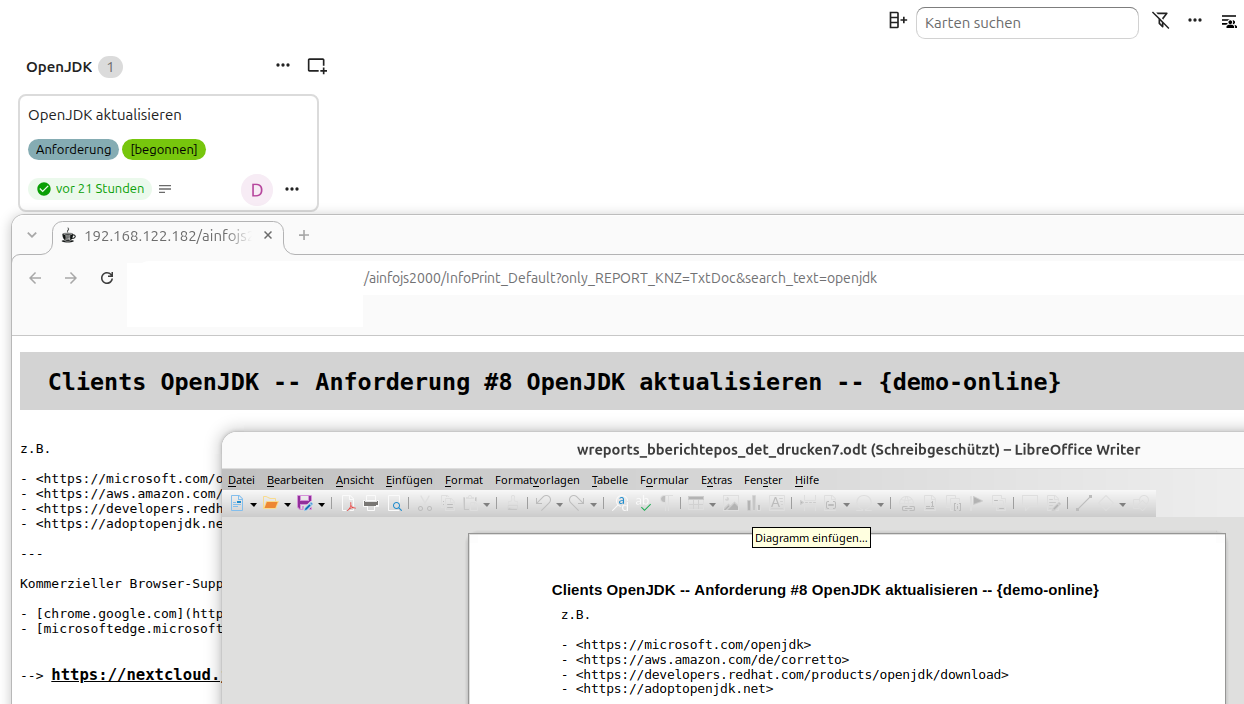
--> /ainfojs2000/InfoPrint_Default?only_REPORT_KNZ=TxtDoc&search_text=IT%25Dokumentation
z.B. Nextcloud Deck
SQL:
----
create view ocl_dec_car_raw as
SELECT
boa.id as boa_id, boa.title as boa_title, boa.deleted_at as boa_deleted_at,
sta.id as sta_id, sta.title as sta_title,
--
car.id as car_id, car.title as car_title, car.description as car_description,
car.owner as car_owner, car.startdate as car_startdate, car.duedate as car_duedate, car.done as car_done,
car.last_editor as car_last_editor, car.last_modified as car_last_modified,
--
( TIMESTAMP WITHOUT TIME ZONE 'epoch' + car.created_at * INTERVAL '1 second' ) as car_created_at_as_ts,
( TIMESTAMP WITHOUT TIME ZONE 'epoch' + car.last_modified * INTERVAL '1 second' ) as car_last_modified_as_ts,
--
car_use.use_participants,
--
car_lab.area_lab_titles, car_lab.psta_lab_titles, car_lab.max_car_done, car_lab.sum_car_archived_raw, car_lab.wsta_lab_titles
--
FROM
oc_deck_boards boa
LEFT OUTER JOIN oc_deck_stacks sta on boa.id = sta.board_id
LEFT OUTER JOIN oc_deck_cards car on sta.id = car.stack_id
LEFT OUTER JOIN ocl_dec_app.ocl_dec_car_use_qry car_use on car.id = car_use.car_id
LEFT OUTER JOIN ocl_dec_app.ocl_dec_car_lab_qry car_lab on car.id = car_lab.car_id
--
WHERE
boa.deleted_at = 0
--
ORDER BY
boa.id, sta.id, car.id
;
z.B. Nextcloud Tabellen
SQL:
----
create view ocl_tab_val_raw_raw as
SELECT
tab.id as tab_id, tab.title as tab_title,
tab_sle.id as sle_id, tab_sle.created_by as sle_created_by, tab_sle.created_at as sle_created_at,
tab_col.id as col_id, tab_col.title as col_title, tab_col.technical_name as col_name,
--
tab_cel_rel.row_id as rel_row_id, tab_cel_rel.value as rel_value,
tab_cel_tex.row_id as tex_row_id, tab_cel_tex.value as tex_value,
tab_cel_num.row_id as num_row_id, tab_cel_num.value as num_value,
tab_cel_dat.row_id as dat_row_id, tab_cel_dat.value as dat_value,
tab_cel_sel.row_id as sel_row_id, tab_cel_sel.value as sel_value
--
FROM
oc_tables_tables tab
LEFT OUTER JOIN oc_tables_row_sleeves tab_sle ON tab.id = tab_sle.table_id
LEFT OUTER JOIN oc_tables_columns tab_col ON tab.id = tab_col.table_id
LEFT OUTER JOIN oc_tables_row_cells_relation tab_cel_rel on tab_sle.id = tab_cel_rel.row_id and tab_col.id = tab_cel_rel.column_id
LEFT OUTER JOIN oc_tables_row_cells_text tab_cel_tex on tab_sle.id = tab_cel_tex.row_id and tab_col.id = tab_cel_tex.column_id
LEFT OUTER JOIN oc_tables_row_cells_number tab_cel_num on tab_sle.id = tab_cel_num.row_id and tab_col.id = tab_cel_num.column_id
LEFT OUTER JOIN oc_tables_row_cells_datetime tab_cel_dat on tab_sle.id = tab_cel_dat.row_id and tab_col.id = tab_cel_dat.column_id
LEFT OUTER JOIN oc_tables_row_cells_selection tab_cel_sel on tab_sle.id = tab_cel_sel.row_id and tab_col.id = tab_cel_sel.column_id
--
ORDER BY
1, 2, 3
;
- 78 - (TxtDoc-2026-10-17.html)
�
Wenn der Innendienst keine Zeit für Erfassungen aufwenden will
jedoch per Desktop Angebote und Abrechnung erledigt.
z.B.
- Nextcloud Kontakte -> Interessenten
- Nextcloud Tabellen -> Anfragepositionen
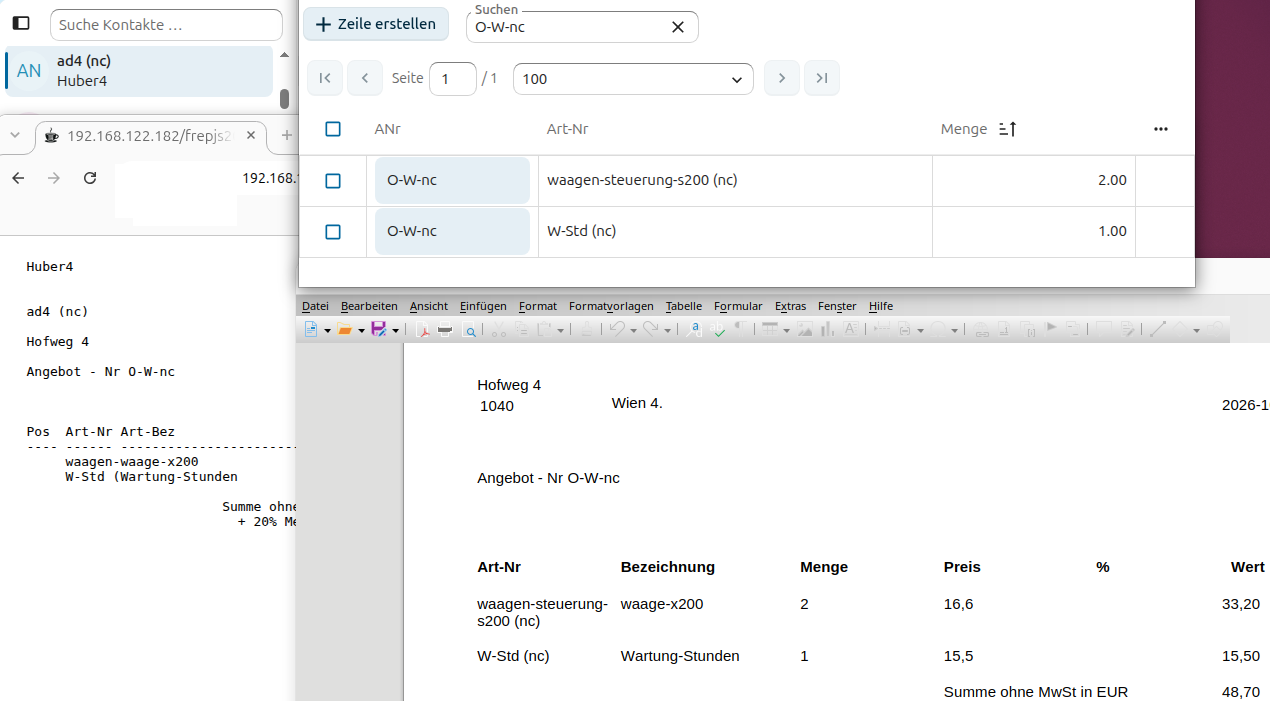
--> /ahp_auftr/?submitaction=%2F%3D%2F&datatable_primarykey=34
z.B. Nextcloud Kontakte
SQL:
----
create view ocl_card_app.ocl_card_raw as
SELECT distinct
cprop.cardid as cardid_adressid,
max( cprop.value ) filter (where name = 'FN') as FN_adressnr,
max( cprop.value ) filter (where name = 'ORG') as ORG_name1,
--
max( cprop.value ) filter (where name = 'CATEGORIES') as CATEGORIES,
split_part( min( cprop.value ) filter (where name = 'CATEGORIES'), ',', 1) as CATEGORIES_adr_knz, -- z.B. I,K
--
max( cprop.value ) filter (where name = 'EMAIL') as EMAIL_email1,
max( cprop.value ) filter (where name = 'TEL') as TEL_telefon,
--
max( cprop.value ) filter (where name = 'ADR') as ADR,
split_part( max( cprop.value ) filter (where name = 'ADR'), ';', 3) as ADR_strasse, -- z.B. ADR ;;R-Platz 34;Wien;;1013;
split_part( max( cprop.value ) filter (where name = 'ADR'), ';', 6) as ADR_plz,
split_part( max( cprop.value ) filter (where name = 'ADR'), ';', 4) as ADR_ort,
--
split_part( max( cprop.value ) filter (where name = 'ADR'), ';', 7) as ADR_land
--
FROM
oc_cards c
join oc_cards_properties cprop on c.id = cprop.cardid
group by
cprop.cardid
order by
1
;
- 79 - (TxtDoc-2026-10-17.html)
�
{
"acal_text": "%PLAN%",
{ "dmloperation": "INSERT", "einn_ausg": "-" }
}
Bitte genehmigen oder ablehnen.
- 80 - (TxtDoc-2026-10-17.html)
�
{
"acal_text": "%IST%",
{ "dmloperation": "UPDATE", "ADRESSE": "Druck RE - Abo" }
}
- 81 - (TxtDoc-2026-10-17.html)
�
Die Todo ist eine einfache Anwendung
und könnte als Basis für individuelles Eigenes sein.
Oder man löst damit autom. Jobs aus.
--> /a_todo4/?submitaction=%2F%3D%2F&datatable_primarykey=2&job=Druck+RE+-+Abo
--> /a_todo4/
- 82 - (TxtDoc-2026-10-17.html)
�
Damit Info-Zeilen/Beiträge für Alle per Hilfe-Button
sichtbar werden,
ist
- im Feld WSTATE 'aktiv-onlineuser-extuser'
- umd eine Zeile mit ADRESSE 'demo-online'
einzutragen.
- 83 - (TxtDoc-2026-10-17.html)
�
{
"acal_text": "%",
{ "dmloperation": "INSERT", "zeitart": "Urlaub" }
}
Bitte genehmigen oder ablehnen.
m.f.g.
AAudit
- 84 - (TxtDoc-2026-10-17.html)
�
Auswahllisten (z.B. ERLEDIGT_LIST)
haben meist eine PostgreSQL-View als Basis
und liefern unter Berücksichtigung der Berechtigung (Rolle)
eine passende Liste.
- 85 - (TxtDoc-2026-10-17.html)
�
Selten zu ändernde Stammdaten (z.B. Konten, Steuercodes, Auswahlmöglichkeiten, ...)
sind mit LibreOffice Base intern zu pflegen.
--> /frepjs2000/Fr_Konditionen_Allgemein
- 86 - (TxtDoc-2026-10-17.html)
�
Server für Webanwendung "Aussendienst4_AT" mit Nutzung von PostgreSQL und JavaScript es6.
Hilfe zu Wiederkehrende Wartungen
unter:
--> https://jobst-software.net/ainfojs2000/InfoPrint_Default?only_REPORT_KNZ=TxtDoc&search_text=%20%23983%20
- 87 - (TxtDoc-2026-10-17.html)
�
sind folgendermaßen anzulegen:
------------------------------
- WSTATE -- mit Text "wart-..."
- BDATUM -- letzes Datum der Wartung. Nach einer Wartung ist dieses Datum auf "heute" zu setzen.
- ADRESSE -- Zyklus z.B. "wart-jaehrl:", "wart-monatl:", "wart-woechentl:2", "wart-taegl:"
- VORGANGSTEXT -- sollte angeben, was zu tun, prüfen und beachten ist.
Wenn man nur die fälligen Geräte sehen will, muss man sich mit einem User anmelden,
der Mitglied der SQL-Rolle "eina_wart_offen_role" ist.
Ein Protokoll ist per LibreOffice Base bzw. der VIEW wart_journal_raw abzurufen.
z.B.
--> https://jobst-software.net/ainfojs2000/Info_Pflege?submitaction=%2F%3D%2F&datatable_primarykey=982
- 88 - (TxtDoc-2026-10-17.html)
�
<dialog id="dialog_todo_pos_details">
<form> <input name="json_input_ele_no" readonly type="hidden" />
<label>Test</label> <input name="Test" />
<label>Ergebnis</label> <input name="Ergebnis" />
</form>
<button name="btnOK" >OK</button>
<button name="btnCancel" >abbrechen</button>
</dialog>
--> /a_todo4/?submitaction=%2F%3D%2F&datatable_primarykey=6
- 89 - (TxtDoc-2026-10-17.html)
�
<dialog id="dialog_todo_pos_details">
<form> <input name="json_input_ele_no" readonly type="hidden" />
<label>Menge</label> <input name="Menge" type="number" />
<label>Ort</label> <input name="Ort" />
</form>
<button name="btnOK" >OK</button>
<button name="btnCancel" >abbrechen</button>
</dialog>
--> https://jobst-software.net/a_todo4/?submitaction=%2F%3D%2F&datatable_primarykey=5
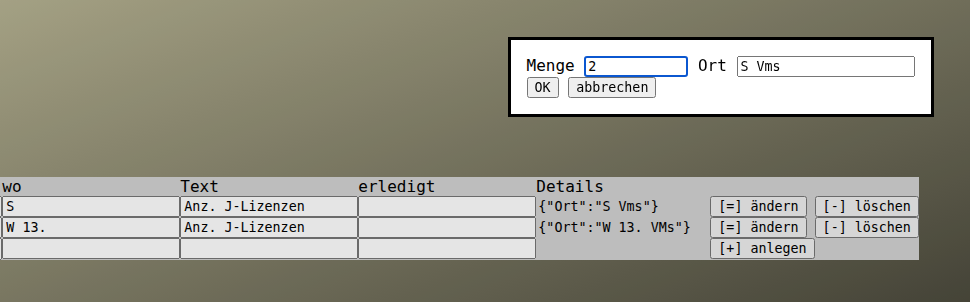
- 90 - (TxtDoc-2026-10-17.html)
�
<dialog id="dialog_todo_pos_details">
<form> <input name="json_input_ele_no" readonly type="hidden" />
<label>Betrag</label> <input name="Betrag" list="TODO_POS_BETRAG_LIST" type="number" />
<label>ANr</label> <input name="ANr" list="TODO_POS_ANR_LIST" />
</form>
<button name="btnOK" >OK</button>
<button name="btnCancel" >abbrechen</button>
</dialog>
<datalist id="TODO_POS_ANR_LIST"> <!-- lt. SQL-View TODO_POS_ANR_LIST -->
$DATA_OPTIONS.TODO_POS_ANR_LIST.ANR_OG.ANR.ANR_TEXT
</datalist>
<datalist id="TODO_POS_BETRAG_LIST"> <!-- lt. SQL-View TODO_POS_BETRAG_LIST -->
$DATA_OPTIONS.TODO_POS_BETRAG_LIST.BETRAG_OG.BETRAG.BETRAG_TEXT
</datalist>
--> /a_todo4/?submitaction=%2F%3D%2F&datatable_primarykey=1
- 91 - (TxtDoc-2026-10-17.html)
�
{
"SELECT_FDNAMES": "cos_id, vorgang_knz, adressnr, konto, konto_text, s_betrag, h_betrag",
"FROM_SCHEMA": "aea_cos",
"FROM_QRY": "buchhaltung_saldenliste_vorgang_qry"
}
--> https://jobst-software.net/frepjs2000/AReport?nur_AREPORT=Saldenliste&report_search_text=%25&format=html
- 92 - (TxtDoc-2026-10-17.html)
�
{
"SELECT_FDNAMES": "vorgang_knz, adressnr, beldatum, artikelnr, lagerort, bewegungs_menge",
"FROM_SCHEMA": "al_storage",
"FROM_QRY": "l_storage_bestandsliste_qry"
}
--> https://jobst-software.net/frepjs2000/AReport?nur_AREPORT=Bestandsliste&report_search_text=%25&format=csv
- 93 - (TxtDoc-2026-10-17.html)
�
{
"SELECT_FDNAMES": "inv_bew_am, adresse, kategorie, bezeichnung, ek",
"FROM_SCHEMA": "a_todo4",
"FROM_QRY": "FSammlung_qry"
}
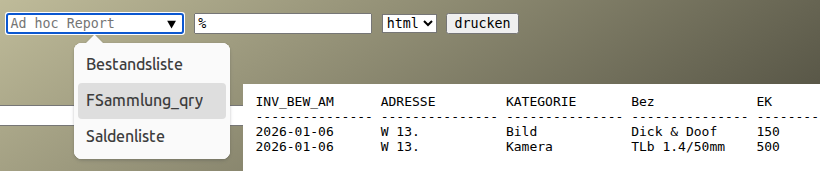
--> /frepjs2000/AReport?nur_AREPORT=FSammlung_qry&report_search_text=%25&format=html
- 94 - (TxtDoc-2026-10-17.html)
�
<dialog id="dialog_todo_pos_details">
<form> <input name="json_input_ele_no" readonly type="hidden" />
<label>Kategorie</label> <input name="Kategorie" list="Kategorie_LIST" />
<label>Bezeichnung</label> <input name="Bezeichnung" />
<hr />
<label>Zustand</label> <input name="Zustand" />
<hr />
<label>EK</label> <input name="EK" type="number" />
<label>mögl. VK</label> <input name="VK" type="number" />
<hr />
<label>Stand</label> <input name="Stand" type="date" />
</form>
<button name="btnOK" >OK</button>
<button name="btnCancel" >abbrechen</button>
</dialog>
<datalist id="Kategorie_LIST">
<option>Kamera<option>
<option>DVD<option>
<option>Bild<option>
</datalist>
--> /a_todo4/?submitaction=%2F%3D%2F&datatable_primarykey=11
- 95 - (TxtDoc-2026-10-17.html)
�
<dialog id="dialog_ahr_cal_details">
<form> <input name="json_input_ele_no" readonly type="hidden" />
<label>Archiv</label> <input name="Archiv" type="date"
placeholder="im Archiv ab (Wartung, dann per User mit ahr_cal_archive_role)" />
</form>
<button name="btnOK" >OK</button>
<button name="btnCancel" >abbrechen</button>
</dialog>
--> /ahr_cal/?submitaction=%2F%3D%2F&datatable_primarykey=12
- 96 - (TxtDoc-2026-10-17.html)
�